Blogging
Google blogger beginner guide

Google blogger beginner guide. For anyone wishing to launch a blog, Google Blogger offers an easily accessible platform. Blogger makes it simple to produce, publish, and manage material online with its user-friendly interface, customizable themes, and smooth integration with Google services. You’ll be well on your way to creating a successful online presence with Google Blogger if you follow the instructions in this article and remain dedicated to your blogging endeavor.
GOOGLE BLOGGER BEGINNER GUIDE
For anyone wishing to launch a blog, Google Blogger offers an easily accessible platform. Blogger makes it simple to produce, publish, and manage material online with its user-friendly interface, customizable themes, and smooth integration with Google services. You’ll be well on your way to creating a successful online presence with Google Blogger if you follow the instructions in this article and remain dedicated to your blogging endeavor.
Getting Started
1. Sign Up for a Google Account:
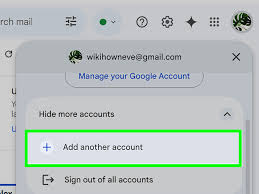

If you don’t already have one, sign up for a Google account. This will give you access to Blogger and other Google services.
2. Access Blogger: Once you have a Google account, visit the Blogger website (blogger.com) and sign in using your Google credentials.
3. Create Your Blog: Click on the “Create New Blog” button to begin the process of setting up your blog. You’ll be prompted to choose a title for your blog and a unique URL (web address).
Designing Your Blog;

1. Choose a Theme: Blogger offers a selection of customizable themes to choose from. Browse through the options and select a theme that suits your style and niche.
2. Customize Your Theme: Once you’ve chosen a theme, you can customize it to match your preferences. This includes changing colors, fonts, and layout options to create a unique look for your blog.
Creating and Publishing Content
1. Write a New Post: To create a new blog post, click on the “New Post” button in the Blogger dashboard. This will open a text editor where you can write and format your post.
2. Add Images and Multimedia: Enhance your blog posts by adding images, videos, and other multimedia content. Blogger makes it easy to upload and embed media directly into your posts.
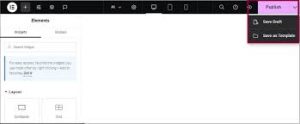
3. Preview and Publish:

Google blogger beginner guide
Before publishing your post, preview it to ensure everything looks as intended. Once you’re satisfied, click the “Publish” button to make your post live on your blog.
Managing Your Blog
1. Dashboard: The Blogger dashboard is your central hub for managing your blog. From here, you can view your blog’s stats, manage comments, and access various settings.
2. Customize Settings: Explore the settings menu to customize various aspects of your blog, such as privacy settings, search preferences, and mobile settings..
Engaging with Your Audience;


Google blogger beginner guide
1. Enable Comments: Encourage interaction by enabling comments on your blog posts. Engage with your audience by responding to comments and fostering discussions.
2. Promote Your Blog: Share your blog posts on social media platforms and engage with other bloggers in your niche. Building a community around your blog will help increase visibility and attract more readers.
Summary
You don’t need to know how to code to publish blogs using Google Blogger, a free and user-friendly platform. It integrates easily with your current Google account and Google AdSense for simple monetization, requires no hosting expenses, and only takes a few minutes to set up.