Uncategorized
How to restore deleted videos on Iphones

How to restore deleted videos on Iphones. Although losing priceless images can be upsetting, lost photos on iPhones can be recovered with the correct information and resources. There are ways to restore those treasured memories, whether you’re using third-party software, iCloud, iTunes, or the “Recently Deleted” album. To ensure that your images are always safe and secure and to prevent potential data loss, don’t forget to routinely backup your iPhone.
HOW TO RESTORE DELETED VIDEOS ON IPHONES
In the age of smartphones, our devices serve as our digital albums, capturing cherished memories in the form of photos and videos. But what happens when those precious moments are accidentally deleted? Don’t fret – if you’re an iPhone user, there are ways to restore deleted photos and retrieve those special memories. In this comprehensive guide, we’ll walk you through the step-by-step process of recovering deleted photos on iPhones.
1. Check Recently Deleted Album:
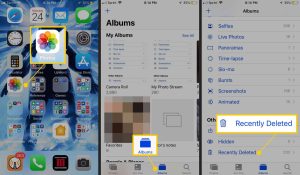

– When you delete a photo on your iPhone, it doesn’t immediately disappear permanently. Instead, it gets moved to the “Recently Deleted” album, where it stays for a specified period before being permanently deleted.
– Open the Photos app on your iPhone and navigate to the “Albums” tab.
– Scroll down and look for the “Recently Deleted” album. Tap on it to open.
2. Restore Photos from Recently Deleted Album:
– In the “Recently Deleted” album, you’ll find all the photos and videos you’ve deleted within the last 30 days.
– Tap on the photo(s) you want to restore.
– Tap on the “Recover” option located at the bottom-right corner of the screen.
– Confirm by tapping “Recover Photo” to restore the selected photo(s) to their original album.
3. Restore from iCloud Photos:
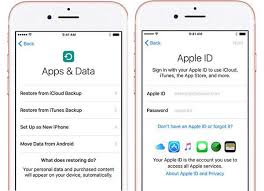

– If you use iCloud Photos to sync your photos across devices, deleted photos may still be recoverable from your iCloud account.
– Open the Photos app and go to the “Albums” tab.
– Scroll down and select “Recently Deleted.”
– Tap on “Select” in the upper-right corner, then choose the photos you want to recover.
– Tap on “Recover” to restore the selected photos.
4. Use iCloud Backup:
– If you have an iCloud backup that includes the deleted photos, you can restore your iPhone from that backup to recover them.
– Go to Settings > [your name] > iCloud > Manage Storage > Backups.
– Select the relevant backup that contains the deleted photos.
– Erase your iPhone by going to Settings > General > Reset > Erase All Content and Settings.
– Set up your iPhone again and choose to restore from iCloud Backup during the setup process.
5. Use iTunes Backup:

How to restore deleted videos on Iphones
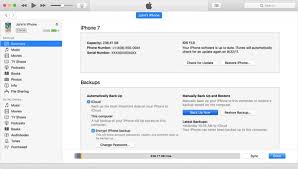
– If you regularly back up your iPhone to iTunes on your computer, you can restore deleted photos from a previous backup.
– Connect your iPhone to your computer and open iTunes.
– Select your device when it appears in iTunes.
– Choose “Restore Backup” and select the backup that contains the deleted photos.
– Click “Restore” and wait for the process to complete.
6. Third-Party Data Recovery Software:
– If you don’t have an iCloud or iTunes backup and the photos are not in the “Recently Deleted” album, you can try using third-party data recovery software.
– There are various software options available, such as Dr.Fone, PhoneRescue, and iMyFone D-Back, which can help recover deleted photos from iPhones. Ensure to choose a reputable software and follow the instructions provided.
Tips for Preventing Photo Loss in the Future:

How to restore deleted videos on Iphones
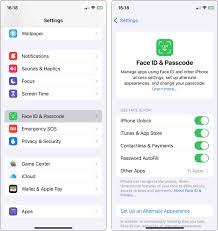
– Regularly back up your iPhone using iCloud or iTunes to ensure that your photos are safely stored.
– Enable iCloud Photos to automatically sync your photos and videos across all your Apple devices.
– Be cautious when deleting photos, and double-check before confirming deletion to avoid accidental loss.
Summary
Check the Recently Deleted album in the Photos app, which retains files for 30 days, to recover deleted videos on an iPhone. Choose the video and click “Recover” after opening Photos > Albums > Recently Deleted. Restore from a prior iCloud or computer backup if it’s not there.