Social media
Tips for Editing IG Post

Tips for editing IG post. Focus on taking excellent, well-lit images (ideally in natural light) and use third-party programs like Lightroom or VSCO for expert edits to produce captivating Instagram posts. Use comparable filters to keep the concept constant, then use tools for warmth and structure to bring out the details. Before posting, make compositional edits by cropping and, most importantly, check the tags and captions.
TIPS FOR EDITING IG POST
Instagram is all about sharing moments, but what happens when you realize you made a mistake in a post? Fortunately, Instagram allows you to edit your captions, tags, and even the location of your posts after they’ve been published. Here’s a step-by-step guide on how to edit an already posted post on Instagram:
1. Open Instagram:


Launch the Instagram app on your mobile device and log in to your account if you haven’t already done so.
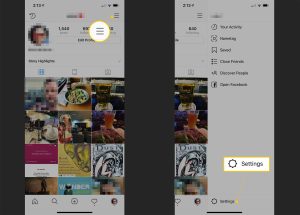
2. Navigate to Your Profile:
Tap on your profile picture or navigate to your profile by tapping on the profile icon in the bottom right corner of the screen.
3. Select the Post to Edit:


Scroll through your posts and find the one you want to edit. Tap on the post to open it.
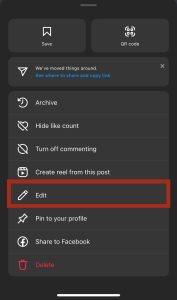
4. Tap on the Three Dots:
In the top right corner of the post, you’ll see three dots. Tap on them to reveal a menu of options.
5. Choose “Edit”:

TIPS FOR EDITING IG POST
From the menu options, select “Edit.” This will allow you to make changes to your post.
6. Make Your Edits: You can now edit the caption, add or remove tags, and change the location of your post. Simply tap on the respective fields to make your changes.
7. Review Your Changes: Before finalizing your edits, take a moment to review them to ensure everything looks good.
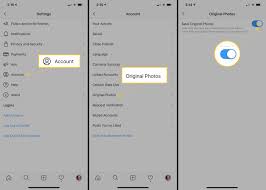
8. Save Your Changes:

TIPS FOR EDITING IG POST
Once you’re satisfied with your edits, tap on the “Done” or “Save” button, depending on your device. Your changes will be saved, and the post will be updated on your profile.
9. Notify Your Followers: If your edits significantly change the context of your post, you may want to consider adding a comment or updating your Instagram Story to inform your followers about the changes.
10. Enjoy Your Updated Post:

TIPS FOR EDITING IG POST
Now that your post is edited and updated, you can continue to engage with your followers and enjoy the content you’ve shared.
Keep in mind that Instagram has restrictions even though it lets you change some parts of your photos. For example, once a photo or video is submitted, it cannot be edited. Furthermore, changes might not always take effect right away, particularly if your content has been live for a while.
Summary
You can quickly update your Instagram posts and make sure that your content is consistently accurate and interesting by following these easy steps. Enjoy your editing.