Editing
Essential tools for color calibration

Essential tools for color calibration. The process of modifying and standardizing the colors shown on a monitor or other display device in order to guarantee precision and uniformity is known as color calibration. In an increasingly digital world where visual content is produced and seen on a range of devices, color integrity must be maintained from creation to consumption. Color calibration is necessary for this. Color accuracy is crucial for professionals in industries like photography and video production. Inconsistencies in print or digital output, misreading of visuals, and eventually discontent among customers or viewers are all consequences of inaccurate coloring. Professionals can achieve more consistent and dependable outcomes by calibrating monitors and other display devices to ensure that the colors they see exactly reflect the colors in their photos or videos.
ESSENTIAL TOOLS FOR COLOR CALIBRATION
Hardware colorimeters (such as Datacolor SpyderPro and Calibrite Display Pro) and software that measures screen colors and generates ICC profiles for accuracy are essential color calibration tools. To guarantee consistent, accurate colors across displays, printers, and devices, these tools are essential for creatives, photographers, and video editors. Color calibration is the cornerstone of ensuring accurate and consistent colors in visual media, whether it’s photography, filmmaking, graphic design, or any other creative endeavor. In this comprehensive guide, we’ll delve into the importance of color calibration and explore the essential tools needed to achieve precise color accuracy.
1. Hardware Colorimeter:
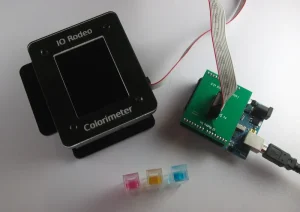

A tool for measuring and evaluating the colors shown on a monitor is a hardware colorimeter. In order to test color accuracy, it usually consists of a sensor that is mounted on the monitor screen and software that talks to the sensor. Popular brands include X-Rite and Datacolor, which offer a range of colorimeters suitable for different budgets and needs.
2. Calibration Software:
Calibration software is used in conjunction with a hardware colorimeter to perform the calibration process. This software guides users through the calibration process, taking measurements of various color patches displayed on the screen and adjusting monitor settings accordingly. Examples of calibration software include X-Rite i1Profiler and Datacolor SpyderX software.
3. Reference Images:

ESSENTIAL TOOLS FOR COLOR CALIBRATION
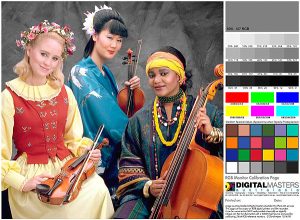
When assessing color accuracy throughout the calibration process, reference images—standardized photos with known color values—are utilized. These images typically include a range of colors, gradients. And patterns designed to test various aspects of color reproduction, such as hue, saturation, and brightness. Calibration software often includes built-in reference images for this purpose.
4. Monitor Hood:
A monitor hood is a shield that attaches to the monitor to reduce glare and ambient light. Ensuring more accurate color perception during the calibration process. By minimizing external light sources, a monitor hood helps create a controlled environment for color calibration, leading to more reliable results.
5. Color Calibration Targets:

ESSENTIAL TOOLS FOR COLOR CALIBRATION
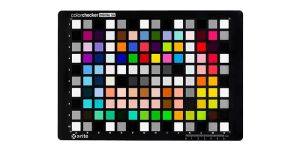
Color is measured and calibrated using it targets, like grayscale and color patches. During the calibration procedure, these goals are shown on the monitor. Allowing the colorimeter to measure and analyze the displayed colors. Calibration software provides instructions for positioning and displaying these targets correctly.
Summary
A key component of preserving color constancy and accuracy in visual media is color accuracy. by making an investment in the necessary color tools and adhering to standard practices. Experts can guarantee that their artistic vision is faithfully reflected on various platforms and gadgets. Whether you work as a graphic designer, photographer, or filmmaker. Gaining proficiency in it is crucial for creating excellent and eye-catching work.