Phone
How to restart Iphone X

How to restart Iphone X. You don’t need a physical Home button to restart your iPhone X or later model thanks to this procedure. It’s a straightforward yet efficient troubleshooting process that can assist refresh the device’s system and fix a variety of software-related problems. You might need to look into additional troubleshooting techniques or contact Apple Support if you keep running into problems that restarting doesn’t fix. Press and hold the side button (right side) and either volume button (left side) at the same time until the power-off slider displays to restart an iPhone X. To turn it back on, drag the slider, wait 30 seconds, and then hold the side button once more.
HOW TO RESTART IPHONE X
Restarting an iPhone X or later model involves a slightly different process compared to earlier models due to the absence of a physical Home button. Here’s how to restart an iPhone X, XS, XS Max, XR, 11, 11 Pro, 11 Pro Max, 12, 12 Mini, 12 Pro, 12 Pro Max, 13, 13 Mini, 13 Pro, or 13 Pro Max. Press and release Volume Up and Volume Down, then hold the side button until the Apple logo displays to force a restart of a frozen screen.
1. Press and Hold Side Button and Volume Button;


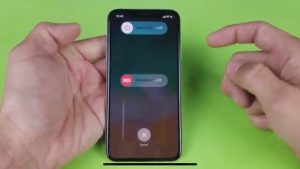
To initiate the restart process, simultaneously press and hold the Side button (located on the right side of the device) and either volume button (either the volume up or volume down button) until the “slide to power off” slider appears on the screen.
2. Slide to Power Off;
Once the slider appears, swipe it from left to right to power off your iPhone. Wait a few moments as the device shuts down completely.
3. Power On;

How to restart Iphone X
After the iPhone has powered off completely, press and hold the Side button again until the Apple logo appears on the screen. Release the button and allow the device to boot up.
4. Wait for Restart;
Your iPhone will go through the boot-up process, which may take a few seconds. Once the process is complete, you’ll be greeted with the lock screen or home screen, depending on your device’s settings.
5. Test Functionality;


How to restart Iphone X
Once your iPhone has restarted, test its functionality to see if the issue you were experiencing has been resolved. Check for responsiveness, app performance, and any other specific issues you were encountering.
Summary
To restart an iPhone X, simultaneously press and hold the volume button on the left side and the side button on the right side until the power-off slider displays. To turn it back on, drag the slider, wait 30 seconds, and then press the side button once more. Press and release Volume Up and Volume Down, then hold the side button until the Apple logo displays to force restart a frozen screen.