Social media
Instagram Post and Tagging

Instagram post and tagging. One easy yet effective strategy to increase interaction, recognize contributions, and build relationships within the Instagram community is to tag people in your pictures. Effective tagging gives your postings more depth and significance, whether you’re sharing intimate moments, working with others, or promoting brands. You can become an expert at tagging on Instagram and engage with your audience more deeply by following the simple steps described in this article and putting the advice given into practice.
INSTAGRAM POST AND TAGGING
Instagram’s tagging tool makes postings more social and engaging by connecting users with companies, friends, and collaborators. Tagging others gives your Instagram posts a personal touch, whether you’re sharing a special moment, working with others, or giving recognition to content creators. In order to improve the social experience on Instagram, we’ll look at the easy ways to tag someone in your posts.
Why Tagging Matters;


Tagging individuals in your Instagram posts serves multiple purposes:
1. Acknowledgment and Collaboration: Tagging allows you to give credit to individuals featured in your posts, collaborate with others, or highlight contributions from specific users.
2. Engagement: Tagged users receive notifications, encouraging them to engage with your post through likes, comments, or shares.
3. Connectivity:


Tags create connections between users, fostering a sense of community and facilitating networking opportunities.
Steps to Tag Someone in Your Instagram Post;
1. Capture or Select Your Content: Start by capturing a photo or video using the Instagram camera or selecting an existing piece of media from your device’s gallery.
2. Editing Your Post: Proceed to the editing screen by tapping the “+” icon at the bottom of the screen or tapping your profile picture to access your gallery. Choose the photo or video you want to share.
3. Adding Tags:


INSTAGRAM POST AND TAGGING
After selecting or capturing your content, proceed to the editing screen. Before sharing your post, tap on “Tag People,” usually represented by a silhouette icon with a “+” sign.
4. Select the Area to Tag: Tap on the specific area of the photo or video where you want to place the tag. You can then type the username of the person you want to tag.
5. Choose the User: As you type the username, Instagram will provide suggestions based on your input. Select the correct user from the suggestions list.
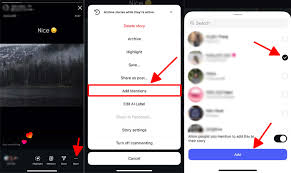
6. Confirm the Tag:

INSTAGRAM POST AND TAGGING
Once you’ve selected the user, tap on their profile to confirm the tag. You can add multiple tags by repeating the process for each user you want to tag.
7. Completing Your Post: After tagging individuals, proceed to add a caption, hashtags, and any additional elements to enhance your post.
8. Share Your Post: Once you’re satisfied with your post, tap on the “Share” button to publish it to your Instagram feed.
Tips for Effective Tagging;


INSTAGRAM POST AND TAGGING
• Be Relevant: Tag individuals who are relevant to the content of your post. This could include friends, collaborators, brands, or featured individuals.
• Be Considerate: Ensure that you have permission to tag someone before doing so, especially if the post includes them in a personal or sensitive context.
Summary
On Instagram, you can tag someone by selecting a spot on the photo, searching for the username, then tapping “Tag People” on the final uploading screen. To edit an existing post, tap the three dots, choose “Edit,” and then click the tag symbol. Tagging adds the post to the user’s “Tagged” profile section, boosts visibility, and gives users credit.