Social media
Tips for private whatsapp group

Tips for private whatsapp group. You can establish a private WhatsApp group that promotes exclusivity, trust, and confidentiality among its members by following these steps. Maintaining privacy guarantees that your group will continue to be a safe and secure place for meaningful interactions, whether it is for personal conversations, professional collaboration, or community building.
TIPS FOR PRIVATE WHATSAPP GROUP
WhatsApp groups offer a convenient platform for communication and collaboration, whether it’s for organizing events, discussing shared interests, or coordinating with colleagues. However, not all groups are meant for the public eye. If you want to maintain privacy and control over who can join your WhatsApp group, there are several steps you can take to make it private. In this guide, we’ll walk you through the process of ensuring that your WhatsApp group remains exclusive to invited members only.
1. Start with a Closed Group:


When creating a new WhatsApp group, opt for the “Closed Group” setting. This setting ensures that only invited participants can join the group, and new members must be added by existing members or administrators.
2. Avoid Sharing the Group Link Publicly:
If you’ve already created a group, refrain from sharing the group link publicly or on social media platforms. Sharing the link indiscriminately increases the risk of unauthorized individuals joining the group without your consent.
3. Manage Group Invitations:


As the group admin, you have the authority to manage group invitations and control who can add new members. To maintain privacy, restrict the ability to add new members to yourself or trustedmembers who understand the importance of privacy.
4. Enable Group Invitation Approval:
WhatsApp offers a feature that allows admins to enable group invitation approval. With this setting enabled, admins must approve any new member requests before they can join the group. To enable group invitation approval, go to Group Settings > Group Permissions > Invite to Group via Link > Admins Only.
5. Vet New Members:


Tips for private whatsapp group
Before adding new members to the group, take the time to vet them and ensure they are trustworthy and aligned with the group’s purpose. Avoid adding individuals who may compromise the privacy or security of the group.
6. Monitor Group Membership:
Regularly monitor the list of group members to ensure that only authorized individuals are part of the group. Remove any members who have joined without permission or who no longer align with the group’s objectives.
7. Set Clear Guidelines:


Tips for private whatsapp group
Establish clear guidelines and rules for group participation, emphasizing the importance of privacy and confidentiality. Communicate these guidelines to all group members and enforce them consistently to maintain a private and secure environment.
8. Encourage Discretion:
Encourage group members to exercise discretion when sharing sensitive information or discussing confidential matters within the group. Remind them of the importance of maintaining privacy and confidentiality at all times.
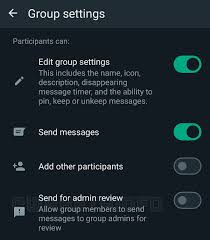
9. Regularly Review Group Settings:

Tips for private whatsapp group
Periodically review and update your group settings to ensure they align with your privacy preferences and security requirements. Stay informed about new features and updates introduced by WhatsApp that may enhance the privacy and security of your group.
Summary
Maintaining a focused, courteous environment in a private WhatsApp group necessitates protecting member privacy and establishing clear boundaries. Enabling “Approve New Members” in settings, restricting admin permissions to limit who may add members or modify group information, and setting explicit content restrictions to stop spam are all important pieces of advice.