
Social media
How to go Viral on Facebook


HOW TO GO VIRAL ON FACEBOOK
How to go viral on Facebook. Going viral on Facebook may alter everything for you, whether you’re a business owner or a content producer. With over 3 billion monthly active users, having millions of people view and share your material is incredibly profitable for individuals and brands. your followers’ interest, such as a picture, video, or story. Facebook’s news feed algorithm notices and makes your content visible to wider audiences if they go on to like, comment, or share it.
HOW TO GO VIRAL ON FACEBOOK
But being viral is no little accomplishment. Your Facebook post must be spot-on to stand out in the face of intense competition and frequent algorithm updates. We’ll go over various Facebook viral methods.
1. Recognize Your Target Market

Reaching every Facebook user is not a prerequisite for going viral. It all comes down to choosing the appropriate audience for your product or content. You may provide specialized content that increases engagement rates by having a thorough understanding of the demographics, interests, and behaviors of your target audience. You can learn a lot about your core audience with analytics tools like Facebook Audience Insights. You can also look at user surveys to see what subjects, goods, or kinds of content are popular right now. Your viral content plan can then be created using this information.
2. Make Use of Powerful, Condensed Headlines
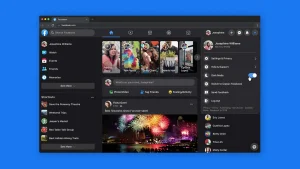
People can be distracted by an attention-grabbing headline when they are aimlessly scrolling through their Facebook News Feed. The typical Facebook ad title is five words long, per AdEspresso. Therefore, departing from this average could make it more difficult for you to get viral on Facebook. Create attention-grabbing, educational, or hilarious headlines. To make them stand out, you can also incorporate statistics and numbers.
3. Engage Your Audience

Content producers will occasionally pose general queries like “How was your day?” or What music is your fave right now? They are perfectly fine, but they aren’t particularly engaging enough to elicit comments. Instead, consider posing challenging or thought provoking queries or claims that make your audience pause.
4. Discuss subjects that people are interested in

Everyone wants to voice their opinions, especially in the social media age. Making material that evokes strong feelings in readers can greatly increase the likelihood that your post will go viral on Facebook. Keeping up with current affairs and trends is one approach to find out what subjects people are enthusiastic about. For instance, make a Facebook post that links to a recent news event that has generated a lot of discussion. This might be anything from a blog piece that fully describes the incident and its effects to a video that offers your distinct viewpoint.
5. Videos

Facebook videos are more likely than any other kind of content to become viral. Nearly 70% of participants in a Databox survey stated that video content generates more Facebook ad clicks than other kinds of content. For anyone hoping to produce viral material, this preference for videos over words and photos is an important realization. Videos captivate viewers for longer than just getting more clicks. When watching a video, users frequently halt their browsing, providing content producers with a broader window to communicate their message and promote interaction.
Summary
These tactics ought to support your content marketing initiatives and help you get viral on Facebook. The important thing is to regularly use these methods and create a viral recipe that works for your page, even though you might be lucky enough to go viral overnight. Thus, continue producing worthwhile and captivating material, try out various formats, engage your audience, and, above all, enjoy yourself! On Facebook, you may strike gold and become a viral sensation.







Tips for editing whatsapp messages. It’s crucial to remember that although these techniques provide means to modify delivered messages, they have drawbacks. If the receiver has previously seen the original communication, for example, they may not be aware of the changes unless specifically mentioned. Additionally, depending on the recipient’s notification settings, modified messages can still show up in notifications.
TIPS FOR EDITING WHATSAPP MESSAGES
In today’s fast-paced digital world, communication often happens in real-time, leading to occasional typos, errors, or unintended messages. WhatsApp, one of the most popular messaging apps worldwide, recognizes the need for users to rectify such mistakes even after hitting the send button. While WhatsApp does offer a built-in feature to edit sent messages directly, there are a few workarounds to achieve this.
1. Quick Fix: Delete and Resend:
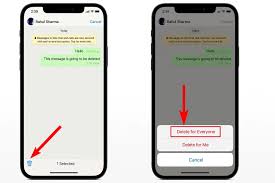
The simplest method is to delete the message immediately after sending it and then resend the corrected version. To do this, long-press the message, tap on the trash bin icon, and confirm deletion. Then, rewrite the message with the necessary corrections and send it again.
2. Edit through Forwarding:
Tips for editing whatsapp messages
Another way to edit a sent message is by forwarding it to the same contact or group with the desired corrections. This method maintains the original message’s context while allowing you to make changes before forwarding it. Simply tap and hold the message, select “Forward,” make the necessary edits in the text field, and then tap the send button.
3. Utilize WhatsApp Web or Desktop: If you’re using WhatsApp on your computer through WhatsApp Web or the desktop app, editing sent messages becomes easier. After sending a message, hover over it, click on the three dots that appear on the right side, and select “Edit.” Make the necessary changes and press Enter to save the edited message.
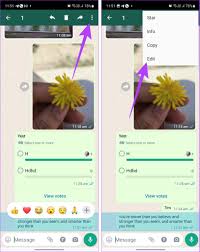
4. Edit it after sending: Updated version of WhatApp supports editing of messages not more than 14 minutes after sending.
Steps

Tips for editing whatsapp messages
– Hold the sent message and few options will pop up, tap on the edit option.
– After editing the error, retype your typos and tap on ✅ that’s all.
Summary
Within 15 minutes of sending a WhatsApp message, you can amend it by long-pressing it and choosing “amend” from the menu. This enables text modifications without generating a new notification; nevertheless, the message will be marked as “modified”. Media files cannot use this capability, however text messages on Android, iOS, and WhatsApp Web may.

Tips for growing instagram. By putting these tactics into practice, you’re creating a community that is passionate about your content in addition to increasing numbers. Recall that genuine interactions and dialogues are at the core of Instagram. Watch your Instagram engagement grow as you continue to evolve and stay loyal to your business.
TIPS FOR GROWING INSTAGRAM
Instagram is a powerful tool for both individuals and businesses in the busy world of social media. Gaining followers is a necessary first step, but creating genuine engagement is where the true magic happens. This is a thorough approach to improving your Instagram presence and building a vibrant community.
1. Craft Compelling Content:
Tips for growing instagram
• Quality reigns supreme. Develop visually appealing and meaningful content that resonates with your target audience.
• Utilize high-resolution images, captivating captions, and storytelling elements to create a lasting impact.
2. Embrace Consistency:
• Establish a consistent posting schedule to keep your audience engaged.
• Consistency not only maintains visibility but also builds anticipation among your followers.
3. Know Your Audience:

• Understand the demographics and interests of your audience.
• Tailor your content to cater to their preferences, ensuring it aligns with their expectations.
4. Leverage Hashtags Strategically:
• Research and use relevant hashtags to expand the reach of your posts.
• Mix popular and niche hashtags to tap into broader and targeted audiences.
5. Engage in Conversations:

Tips for growing instagram
• Respond promptly to comments and direct messages.
• Encourage conversations by posing questions in captions and engaging with your audience’s responses.
6. Host Giveaways and Contests:
• Create excitement and engagement by hosting giveaways or contests.
• Encourage participants to tag friends and share your content, amplifying your reach.
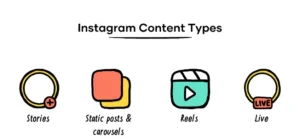
7. Utilize Instagram Stories and Reels:

• Take advantage of Instagram’s features like Stories and Reels to diversify your content.
• Use interactive elements like polls, quizzes, and countdowns to boost engagement. Read more on how to get more engagements on your instagram reels here
8. Collaborate with Others:
• Partner with influencers or other accounts in your niche for shoutouts or collaborations.
• Cross-promotion introduces your content to new audiences.
9. Post at Optimal Times:

Tips for growing instagram
• Understand your audience’s active hours and schedule posts accordingly.
• Use Instagram Insights to identify peak engagement times.
10. Share User-Generated Content:
• Feature content created by your followers.
• This not only acknowledges your community but also encourages others to contribute.
11. Create Shareable Content:

• Craft content that compels users to share with their followers.
• Whether it’s informative, entertaining, or relatable, shareable content broadens your audience.
12. Optimize Your Instagram Bio:
• Craft a concise and engaging bio with a clear call-to-action.
• Include relevant keywords to enhance discoverability.
13. Run Instagram Ads:
• Invest in targeted Instagram ads to reach a broader audience.
• Use compelling visuals and concise captions to convey your message effectively.
14. Analyze and Adjust:

• Regularly review Instagram Insights to gauge the performance of your content.
• Adjust your strategy based on what works best for your audience.
Summary
In order to expand on Instagram in 2026, concentrate on maintaining a regular publishing schedule of three to five times a week, giving priority to Reels for reach, and interacting with your audience to increase loyalty. Use pertinent hashtags, optimize your profile with a clear bio and searchable keywords, and examine your data to determine which material generates the most interaction.

Tips for creating tiktok ads. Monitoring your advertisements is crucial since it gives you insight into their audience reach and analysis. Recall that producing engaging and genuine content is essential for TikTok advertisements. Make your company stand out in the active TikTok community, get attention fast, and follow the platform’s creative trends.
TIPS FOR CREATING TIKTOK ADS
Produce vertical, native-looking content (lo-fi/iPhone style) that feels genuine rather than like a polished commercial to make high-converting TikTok commercials. Within the opening three seconds, concentrate on a compelling hook; use popular sounds; keep videos fast-paced with rapid cuts; and incorporate clear, on-screen text.
Creating ads on TikTok involves a few straightforward steps:
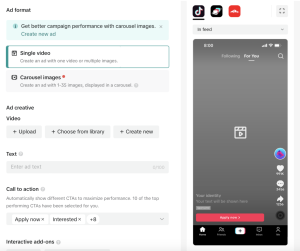
TikTok Ads Manager:
• Open TikTok Ads Manager on your web browser.
• Sign in or create an account if you don’t have.
2. Campaign Creation
• Click on “Create” to start a new campaign.
• Choose your campaign objective, such as Traffic, Conversions, App Installs, or Video Views.
Ad Group Setup:

TIPS FOR CREATING TIKTOK ADS
• Define your target audience by selecting demographics, interests, and behaviors.
• Set your budget and schedule for the ad group.
Ad Creative:
• Choose the ad format: In-Feed Ads, Branded Hashtag Challenges, Branded Effects, or TopView.
• Upload your creative elements, including images, videos, captions, and relevant links.
Tracking and Optimization:
• Set up tracking pixels for conversion tracking.
• Optimize your ad delivery based on performance data.
Review and Launch:

TIPS FOR CREATING TIKTOK ADS
• Double-check all details and settings.
• Click “Submit” to launch your TikTok ad campaign.
Monitor and Adjust:
• Regularly check your campaign’s performance in TikTok Ads Manager.
• Adjust targeting, budget, and creative elements based on data and audience response.
Summary
Instead of overly polished advertisements, make content that seems natural to the platform—fast-paced, amusing, and relatable—if you want to thrive with TikTok Ads. To avoid fatigue, concentrate on a compelling 3-second hook, employ vertical video, make use of popular noises, and update creatives every one to two weeks.

Tips for Emotional stress

Anxiety and stress reduction

Face cleansing tips

A Step-by-Step Guide to Deleting Reels on Instagram

A Comprehensive Guide to Setting Up a YouTube Premiere

How to Create a WhatsApp Group
-

 Social media2 weeks ago
How to Delete Reels on IG
-

 Social media2 weeks ago
Tips for likes and Followers on Facebook
-

 Music2 weeks ago
Lyrics for Iké Nilé
-

 Social media2 weeks ago
Guidelines for Creating a Facebook Page
-

 Photography2 weeks ago
Photography and Outdoors
-

 Social media2 weeks ago
Guidelines for Uploading Videos on Youtube