Social media
Tips for hiding whatsapp status

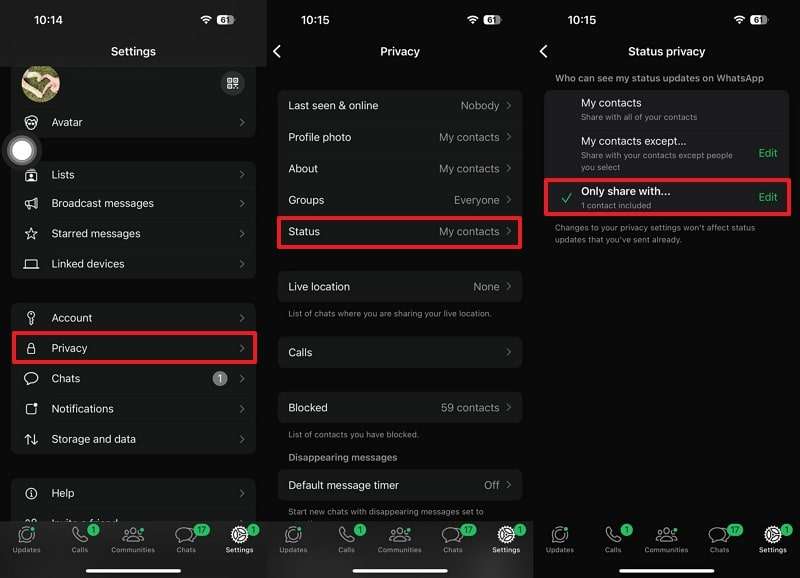
Tips for hiding whatsapp status. The American social media, instant messaging (IM), and voice over IP (VoIP) service WhatsApp Messenger, or just WhatsApp, is available through desktop and mobile applications. The service, which is owned by Meta Platforms, enables users to share photographs, documents, user locations, and other content in addition to sending text, voice, and video messages and making voice and video conversations.
TIPS HIDING WHATSAPP STATUS
With our contacts, WhatsApp has emerged as the preferred tool for exchanging information, stories, and special events. But there can be times when you wish to hide your WhatsApp status from specific people.
Whether it’s to maintain a sense of privacy or to limit who may access your updates, WhatsApp includes a convenient function that allows you to conceal your status from specified friends.
Change your Status Privacy settings to “My contacts except…” or “Only share with…” to conceal your WhatsApp status from certain individuals or the general public. Using the official WhatsApp Help Center, you can easily adjust these settings.
For total control over your status updates, adhere to following specific guidelines and procedures:
How to Hide WhatsApp Status on Android;

Tips for hiding whatsapp status
1) Open your WhatsApp
2) Swipe right to status barTap the three dot menu
3) Select status privacy
4. Next, tap on My contacts except;
5. Simply select the contacts you want to hide your status from.
Don’t worry if you’re having trouble finding a particular contact; you can use the handy search tool to locate them quickly. Once you’ve made your selection, just tap on the checkmark icon to confirm your changes.
If I exclude someone from WhatsApp status will they know;
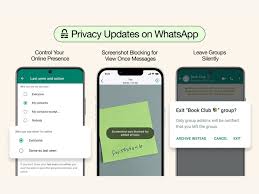
Tips for hiding whatsapp status
One way is to ask a common friend if he sees the status updates of the person who you think have blocked you. If the other person can see, then the person has excluded you. WhatsApp doesn’t let you know if you are excluded or not.
Summary
Managing your privacy on WhatsApp is crucial, and by hiding your status from specific pals, you could have more control over the information you transmit. By following the simple procedures in this article, you can easily modify the accessibility of your WhatApp status and ensure that only specific contacts may see it. Make the most of this feature for a more personalized and safe experience with Whatsapp. Remember that you are responsible for your own privacy.

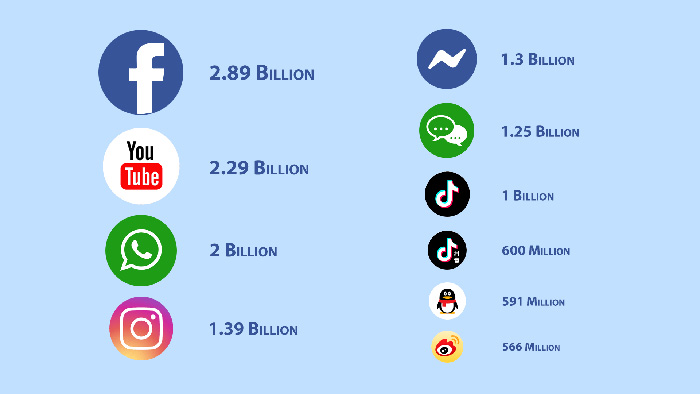
Networking apps for social media. Professional, interest-based, and event-focused platforms are among the top social media networking apps in 2026. While Bumble Bizz and Lunchclub provide AI-powered, one-on-one professional relationships, LinkedIn continues to be the industry leader in career networking. Meetup is the best platform for local events when it comes to community-driven networking, whereas Discord facilitates the development of specialized communities.
NETWORKING APPS FOR SOCIAL MEDIA
The term “social media” refers to online platforms—websites and apps—that enable more than 5 billion individuals worldwide to produce, distribute, and interact via text, images, and videos. Facebook, YouTube, WhatsApp, Instagram, and TikTok are some of the prominent players on these platforms, which are used for both professional and personal networking.
What is Social Media Networking App?
Users and organizations can connect, interact, share information, and build relationships via information, and build relationships via social media networking apps. Using this platform, people can connect with individuals who share their interests. A few instances are Facebook,Instagram,TikTok. Pinterest,WhatsApp, and so on.
1. X;

I suppose we might refer to it as the most basic social media network out there. As it happens, Twitter is among the most entertaining and fascinating. There is a 140 character limit on messages, but that is more than enough to publish a link, share an image, or even converse with your favourite influencer or celebrity.
It just takes a few minutes to set up a new profile with Twitter, which has an easy to use design
2. Facebook;
Some people think Facebook is the same as “social media,” that it’s the one platform where you can locate friends, family, and coworkers all together. While the primary functions of Facebook are the sharing of images, links, and brief personal views, users can also support brands or organizations by becoming followers.
3. WhatsApp;

Networking apps for social media
These days, viral marketing has surpassed traditional social media marketing. Since almost everyone has a smartphone, it is now simple for marketers to send promotional texts, audio files, or videos to their target audience. WhatsApp has developed into a simple way to communicate with loved ones both locally and abroad. It is currently the most inventive and successful marketing strategy for promoting businesses. It is employed to market your company and establish a solid rapport with prospective clients.
4. Instagram;
As most of you are aware, Instagram is one of the most widely used image sharing platforms worldwide.
The company’s app was incredibly helpful from the start and got better with time you have a ton of extra options when sharing photographs in addition to the standard feed you receive. For example, there are a ton of filters available, and the majority of the previous options are still there here
The app is generally very enjoyable to use, has a flat appearance, and does its goal effectively
5. YouTube;

Networking apps for social media
As a platform for sharing videos, YouTube has grown to such an extent that its vast collection of videos has earned it moniker “the world’s second”
largest search reviews, promotional videos, and ” how two” instructions on almost any topic or discipline may all be found on the website.
Users are able to rank, comment, and discuss what they observe.
Summary
LinkedIn for professional branding, Bumble Bizz for career connections through swipes, and Lunchclub for AI-powered one-on-one meetings are the top networking applications for 2026. Meetup, Eventbrite, and MYBZZ are additional excellent options for growing professional networks and locating industry events.
Whatsapp channels creation. You may build a profitable WhatsApp channel that successfully engages your audience, connects you with them, and advances your company’s or organization’s objectives by following these steps. Your WhatsApp channel can become a useful tool in your digital marketing toolbox with the correct approach and persistent work.
WHATSAPP CHANNELS CREATION
WhatsApp has become a commonplace communication tool in today’s linked world. With more than two billion users globally, it’s the perfect platform for companies, groups, and individuals to engage with their target audience. Building a community around your company or cause, sharing updates, and interacting with your fans can all be accomplished with the help of a WhatsApp channel. We’ll walk you through the entire process of setting up a WhatsApp channel in this article.
1. Define Your Purpose:
Before diving into creating your WhatsApp channel, it’s essential to define your purpose. Ask yourself: What do you aim to achieve with this channel? Whether it’s providing customer support, sharing news and updates, or fostering a community, having a clear purpose will guide your content strategy and engagement efforts.
2. Create your channel :
WhatsApp offers a dedicated solution for businesses called WhatsApp Business. It provides features like business profiles, messaging tools, and statistics to help you manage your interactions efficiently. Download the WhatsApp Business app from the App Store or Google Play Store and follow the prompts to set up your business profile.
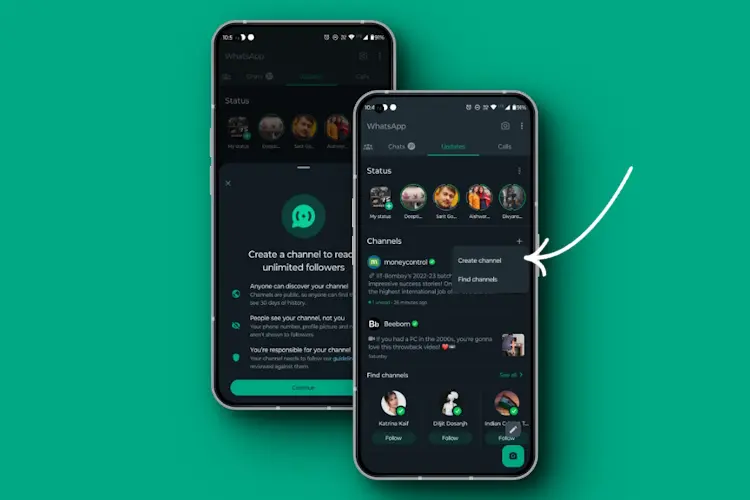
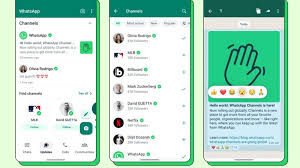
After that, click on the status bar of the Whatsapp app, you will see channels available.
3. Click on create channel and customise Your channel:

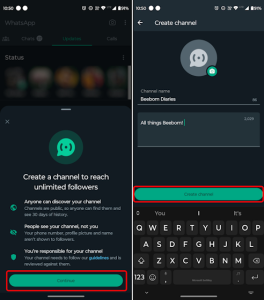
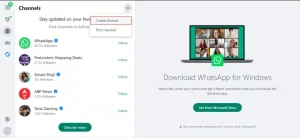
Click on the + sign and you’ll see where it is written “create channel, after that it’s time to customize your profile to reflect your brand identity. Upload a profile picture, add your name and possibly a description. A complete and professional-looking profile will instill trust and credibility among your audience.
4. Create Engaging Content:
Now that your profile is set up, it’s time to start creating content for your WhatsApp channel. Whether it’s text updates, images, videos, or links to relevant resources, make sure your content is engaging, informative, and adds value to your audience. Consider using multimedia formats to make your messages more visually appealing and interactive.
5. Promote Your Channel:
Whatsapp channels creation
Building an audience for your WhatsApp channel requires proactive promotion. Share your WhatsApp number and a brief description of your channel on your website, social media profiles, email newsletters, and other marketing channels. Encourage your existing followers to join your WhatsApp channel to stay updated and engaged.
6. Engage with Your Audience:
Engagement is key to the success of your WhatsApp channel. Respond promptly to messages, address inquiries, and foster discussions within your community. Use WhatsApp’s features like broadcast lists, group chats, and automated responses to streamline your communication and provide timely assistance to your audience.
7. Analyze and Iterate:
Whatsapp channels creation
Regularly monitor the performance of your WhatsApp channel using the built-in analytics provided by WhatsApp Business. Track metrics like message delivery, open rates, and response times to gauge the effectiveness of your efforts. Use these insights to refine your content strategy, optimize your engagement tactics, and continuously improve the overall experience for your audience.
Summary
Open the app, pick the Updates tab, tap the plus symbol next to Channels, and choose Create Channel to start a WhatsApp channel. Add a channel name, description, and icon by following the instructions. Channels are free, have an infinite amount of followers, and don’t reveal your phone number to them.
Whatsapp group creation tips. A quick and easy method to remain in touch with your network and have important conversations is to create a WhatsApp group. WhatsApp groups provide an easy way to communicate and work together, whether for personal or professional reasons.
WHATSAPP GROUP CREATION TIPS
WhatsApp groups are a convenient way to connect with friends, family, colleagues, or like-minded individuals. Whether you want to plan events, discuss topics of interest, or simply stay in touch, creating a WhatsApp group is quick and easy. In this guide, we’ll walk you through the steps to create your own WhatsApp group.
1. Open WhatsApp:

Begin by opening the WhatsApp application on your smartphone. WhatsApp is available for both iOS and Android devices and can be downloaded from the App Store or Google Play Store if you haven’t already installed it.
2. Navigate to Chats:
Once you’re in the WhatsApp interface, navigate to the “Chats” tab located at the bottom of the screen. This is where you’ll find all your existing chats and groups.
3. Tap on the New Chat Icon:
In the Chats tab, look for the icon or button that allows you to start a new chat. On most versions of WhatsApp, this is represented by a chat bubble icon with a “+” sign or a “New Chat” button. Tap on it to proceed.
4. Select “New Group”:
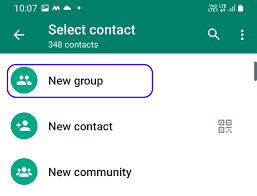
After tapping on the new chat icon, you’ll be presented with several options, including “New Group” and “New Broadcast.” Since we’re creating a group, select “New Group.”
5. Add Participants:
Next, you’ll need to select the participants you want to add to your group. You can choose from your WhatsApp contacts list by tapping on their names. As you select participants, their names will appear at the top of the screen under “Participants.”
6. Set a Group Name:
Whatsapp group creation tips
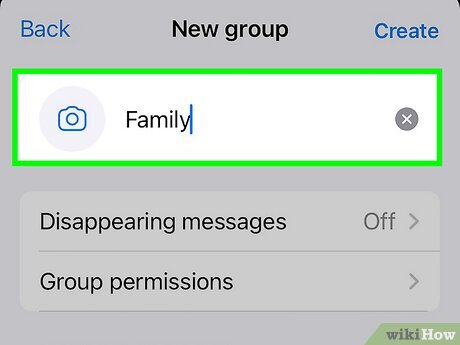
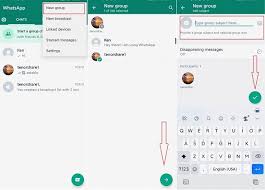
Once you’ve selected all the participants, tap on the “Next” or “OK” button, depending on your device. You’ll then be prompted to set a name for your group. Choose a descriptive and memorable name that reflects the purpose or theme of the group.
7. Customize Group Settings:
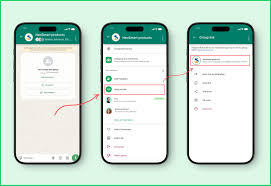
WhatsApp allows you to customize various group settings, such as group description, group icon (profile picture), and group privacy settings. You can access these options by tapping on the group name at the top of the chat screen and then selecting “Group Info” or “Group Settings,” depending on your device.
8. Create Your Group:
Whatsapp group creation tips
Once you’ve set the group name and customized the settings to your liking, tap on the “Create” or “Done” button to create your WhatsApp group. The group will be instantly created, and all selected participants will be added to it.
9. Start Chatting:
Congratulations! You’ve successfully created a WhatsApp group. You can now start chatting with the members of your group by sending messages, sharing photos and videos, or making voice and video calls directly from the group chat interface.
10. Manage Your Group:

Whatsapp group creation tips
As the group admin, you have the ability to manage the group by adding or removing participants, changing group settings, and moderating discussions. Be mindful of group guidelines and ensure that all members adhere to them to maintain a positive and productive group environment.
Summary
Establish a clear goal for your WhatsApp group, give it a short name (no more than 100 characters), and include a recognizable group icon. Establish community rules early on to keep things focused, designate several administrators for larger groups, and use tools like “[Disappearing Messages)” to make discussion interesting.

Review for saint laurent black

Varieties of perfumes for women

Feminine body mists

A Step-by-Step Guide to Deleting Reels on Instagram

A Comprehensive Guide to Setting Up a YouTube Premiere