Meeting
How to join google meet

How to join google meet. Google created a video communication tool called Google Meet. Along with Google Chat, it is one of two programs that will take the place of Google Hangouts. On November 1, 2022, it took the position of Google Duo, a consumer-facing app. The Duo mobile app was rebranded Meet, and the previous Meet app was scheduled to be phased out.
HOW TO JOIN GOOGLE MEET
Google announced in the early months of the COVID-19 epidemic that Meet would now be accessible to all users, not only those who used Google Workspace. In contrast to Zoom, which had 200 million daily users as of the final week of April 2020, Meet had a 30-fold increase in usage between January and April 2020, with 100 million daily users.
Use direct link;

How to join google meet
You can join the meeting by just clicking on the link if you have one. You can use your mobile device or laptop for this. As an alternative, you can copy the URL and paste it into your browser’s URL bar.
You will notice choices to turn off your camera and mute your microphone after you are sent to the joining page. Navigate to the ‘join’ button on the right-hand side of your screen when you’re ready. You may join the Google Meet conference right away by clicking the “join now” button.
Access through a calendar invitation;
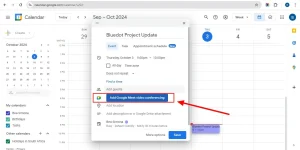
Go to your calendar and find the appropriate invitation if you have a prearranged appointment. Press the link of the scheduled event. You will see a button that says “Join with Google Meet” on the pop-up
Join a meeting directly from the website.

How to join google meet
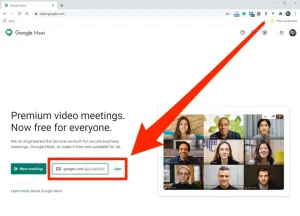
Go to the Google Meet page and enter a code, nickname, or link in the designated field. Click ‘Join’ after that. You must click “Join Now” on the joining screen that appears after clicking the link.
Access Google Meet on mobile devices with or without using the mobile app.
You can sign up for Google Meet on a mobile device by using the Google Meet website, a direct link, or the calendar. Downloading the Google Meet app—available for iOS and Android devices—may improve your experience.
Join directly from Gmail.
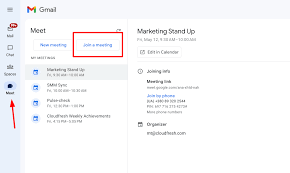
Open Gmail and select the ‘Meet’ icon from the left column. Click ‘Join now’ after selecting the meeting you want to attend.
Join Google Meet even without a Google account;

How to join google meet
The meeting host must provide a conference link or code for the attendee to access a Google Meet without having a Google Account. It’s crucial to remember that these users are unable to call meetings on their own. Additionally, individuals can only join a meeting through the Google Meet desktop app because the mobile app cannot be used without a Google Account.
Let’s walk through the steps together:
- Get the joining code or link from your meeting host.
- Head over to the Google Meet website.
- Look for the ‘Enter a code or link’ box near the bottom of the screen.
- Paste the meeting link or code into the box.
- Click ‘Join‘.
Summary
While Google Meet upgraded the original Hangouts app with the aforementioned features, several basic Hangouts functionality—such as the ability to display attendees and talk at the same time—were discontinued. In order to give priority to participants who have used their microphones the most recently, the maximum number of video streams that may be displayed at once was been lowered to 8 (although up to 4 feeds can be displayed in the “tiles” arrangement).