NYSC
NYSC Registration Tips



NYSC registration tips. Get your NIN ready and make sure all of your paperwork are consistent before registering with NYSC, particularly your names, DOB, and course. Be sure to dress professionally for the webcam photo, finish the registration process at an authorized cyber cafe with a dependable internet connection, and be mindful that information such as degree of study and date of birth cannot be altered after camp. Make sure your name, birthdate, and graduation date appear exactly the same on all of your documents, including your JAMB, school records, and NIN.
NYSC REGISTRATION TIPS
In this post, we’ll go over everything you need to know about NYSC registration, including how to register for the NYSC program service year via the authorized NYSC registration online URL. You should be aware of the following details. Above all, you must be a graduate of a Nigerian or foreign university with accreditation.
Above all, you must have graduated from an approved university in Nigeria or elsewhere. Second, you need to pick up your graduation certificate or statement of results from your school. Finally, you will often need to complete the online registration process on the NYSC portal a few months before the start of the service year.
The steps Easy online NYSC registration process;
- Visit the NYSC Official Website at www.nysc.gov.ng
- Create An Account
- Fill In Your Personal Details
- Upload Your Documents
- Choose Your Preferred Deployment Location
- Submit Your Registration
1. Visit the NYSC Official Website;

NYSC REGISTRATION TIPS
To begin the registration process, go to www.nysc.gov.ng, the NYSC website. To choose the relevant batch for registration, click “Mobilization Batch” on the webpage.
2. Create An Account;
Next, choose “Fresh Registration” by clicking on “Mobilization Register.” Your email address and password will be required when you create an account.
3. Fill in Your Personal Details;
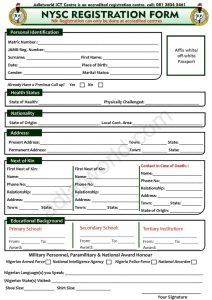
NYSC REGISTRATION TIPS
After creating an account, the registration portal will be displayed to you. Enter your contact information, name, and birthdate in the personal fields.
4. Upload Your Documents;
You will need to upload scanned copies of your documents, such as your passport photo, school identity card, and statement of result, after entering your personal information.
5. Choose Your Preferred Deployment Location;

NYSC REGISTRATION TIPS
It will be necessary for you to choose from the available alternative the deployment place that you like.
6. Submit Your Registration;
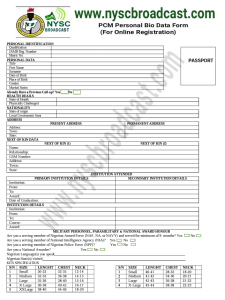
To finish registering after filling out all the essential fields, click “Submit.”
Summary
All PCMS must be aware of the requirements and know how to easily and correctly register for the National Service Youth Corps (NYSC) online because the registration process for potential corps members has begun.

Multiple System Atrophy

Key Relevance of Monounsaturated Fats

Best Proteinous Fruits

A Step-by-Step Guide to Deleting Reels on Instagram

How to Create a WhatsApp Group