Social media
Tips for likes and Followers on Facebook

Tips for likes and followers on facebook. By creating a Facebook page, one may communicate with friends, family, and future followers in an unmatched way thanks to Facebook’s enormous user base. To increase your audience and reach, you must actively promote your page rather than just making one. Asking your friends to like and follow your page is one of the best methods to get this process started. We’ll walk you through the process of inviting friends to support your Facebook page in this guide.
TIPS FOR LIKES AND FOLLOWERS ON FACEBOOK
Posting excellent, shareable material (videos/reels) on a regular basis will increase your Facebook likes and followers. Invite post-reactors, use engagement advertisements, and cross-promote on other platforms. To increase trust, make sure your bio, action button, and photo are all obvious. Using pertinent, wide-ranging hashtags and interacting with followers via comments boosts visibility.
Step 1: Navigate to Your Facebook Page
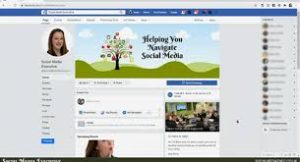

First, log in to your Facebook account and navigate to the Facebook page you want to promote. You can do this by clicking on the page’s name in the left sidebar of your Facebook homepage.
Step 2: Locate the Invite Friends Button
Once you’re on your page, look for the “Invite Friends” button. You can typically find this button near the top right corner of the page, next to other page management options.
Step 3: Choose Friends to Invite
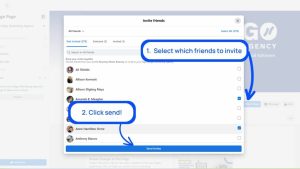

Clicking on the “Invite Friends” button will bring up a list of your Facebook friends. You can scroll through this list or use the search bar to find specific friends you want to invite to like your page.
Step 4: Send Invitations
Next to each friend’s name, you’ll see an “Invite” button. Click on this button to send an invitation to that friend to like your page. You can also select multiple friends at once by checking the boxes next to their names and then clicking the “Invite” button at the bottom of the list.
Step 5: Personalize Your Invitations

TIPS FOR LIKES AND FOLLOWERS ON FACEBOOK
While Facebook provides a default invitation message, you can personalize your invitations to make them more engaging and compelling. Simply click on the “Edit” button next to a friend’s name to customize the invitation message before sending it.
Step 6: Follow Up and Remind
If some of your friends don’t respond to your initial invitations, don’t be afraid to follow up and remind them politely. You can send them a direct message or mention your page in a post on your personal profile to encourage them to check it out.
Step 7: Share Your Page Publicly

TIPS FOR LIKES AND FOLLOWERS ON FACEBOOK
In addition to inviting friends directly, consider sharing your page publicly on your personal profile and other social media channels. This allows you to reach a wider audience beyond your immediate circle of friends and can help attract more followers to your page.
Step 8: Engage with Your Followers
As your page grows and you start to gain followers, it’s essential to engage with them regularly. Respond to comments, messages, and reviews promptly, and create content that encourages interaction and conversation among your followers.
Step 9: Analyze Your Progress

TIPS FOR LIKES AND FOLLOWERS ON FACEBOOK
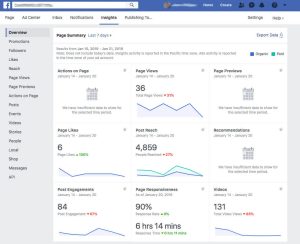
Finally, use Facebook Insights to track the performance of your page and the effectiveness of your promotional efforts. Insights provide valuable data on your page’s reach, engagement, and audience demographics. Allowing you to refine your strategy and optimize your page for success.
Summary
By doing these things and aggressively telling your friends and others about your Facebook site. On the biggest social media network in the world, you may increase your audience, reach a wider audience, and accomplish your objectives.