
WRITING
Tips for Writing a Graphic Novel


Tips for writing a graphic novel. When you consider the sheer amount of storytelling genres, it’s very astounding. We have ways to produce and share stories since they are a big part of our lives. The graphic novel is one of the most gratifying and difficult of them.
TIPS FOR WRITING A GRAPHIC NOVEL
This content will teach you how to write a graphic novel, regardless of whether you want to collaborate with an illustrator or try writing and drawing a story yourself. Remember that there is no one way to compose your graphic novel as we move through this part. Similar to how there is no one correct technique to write any other kind of story. The best approach is the one that suits you.
1. Choose Your Concept
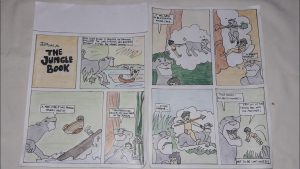
Every graphic novel begins with a plot premise, just like any other piece of fiction. Even though the graphic book is a type of visual storytelling, I would advise not emphasizing that element too much when developing your story idea and outline the story . Rather, focus on creating a tale that is both captivating and profitable.
2. Select Your Illustration Style
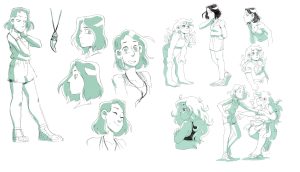
While many do not, some graphic novelists write both the screenplay and the images. You might already know the illustration style you want to utilize if you’re an artist and want to work on the project entirely by yourself. If not, now would be an excellent moment to get it right and describe your point of view.
3. Know your style
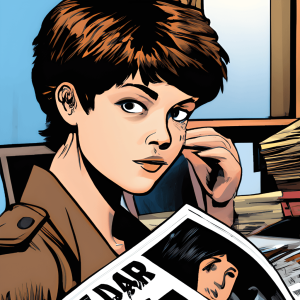
The plot will come to you more easily after you have a clear idea of the style you want. This is a significant portion of it since it is such a visual medium. If you’re not undertaking the entire graphic novel project yourself, knowing the style will also assist you pick an artist.
4. Write Your Initial Draft of the Script

Writing a graphic novel differs from writing a short story or novel. Actually, it’s more like creating a script in many aspects. Nevertheless, there are other approaches to writing your graphic novel script, in contrast to the industry-standard screenplay structure. It’s definitely possible to write your script on software like Final Draft if you have access to it. However, using a program like Microsoft Word is just as simple.
5. Make Your Script Better
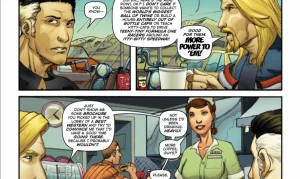
It will help you think like a graphic novelist to write the first draft. You will develop the habit of seeing the panel, including the number of characters, the background, and any dialogue that must fit within. Every panel in a graphic novel or comic book has a lot going on. This is why it’s so helpful to edit your script once you’ve finished the first draft.
6. Locate an Illustrator
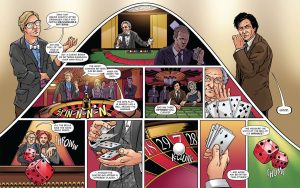
It’s crucial to remember that the majority of graphic novels that are traditionally published are created by a group of people. There are colorists, inkers, and letterers. But if you keep that in mind, you can locate an illustrator who can achieve all these things.
Summary
Nevertheless, making a graphic novel is a difficult but worthy undertaking. Additionally, it can undoubtedly improve your creative writing skills. I hope that this post has been able to properly and efficiently guide you through the process.
Good Writing Tips. Drafting and editing should be kept apart if you want to enhance your work right away. To get your ideas down on paper, swiftly write your initial draft without self-correction. After that, read your work aloud to identify any problematic wording and tighten your sentences by eliminating superfluous words.
GOOD WRITING TIPS
Tips for good writing. Whether you’re writing in your private journal or for your website, the suggestions below can help you enhance your ability to create content and elevate your writing from excellent to exceptional.
What is Good Writing?

Good writing is well organized and flows smoothly, having a consistent style or voice from start to finish. Good writing is also free of typos and faults in spelling, punctuation, and grammar.
Steps for Good Writing;
1. Write every day. Writing daily will help you improve your skills and sharpen your ability to construct grammatically accurate and appealing sentences
2. Use Active Voice: It’s more engaging than passive voice. Consider how “My mother baked the cake” is superior to “The cake was baked by my mother.”
3. Be a voracious reader Read widely to expand your vocabulary and improve your understanding of diverse writing styles. Explore various genres and authors.
4. Be clear and concise. For efficient communication, use clear and precise language. Avoid using unnecessary or flowery jargon that obscures your meaning.

5. Vary sentence structure. Change the structure of your sentences. This will make your writing more engaging for the reader.
6. Avoid overused words. Avoid using clichés and overused phrases. Strive to come up with innovative ways to express what you’re saying.
7. Be descriptive. Use descriptive language to assist your reader in envisioning your words. This will make what you wrote more memorable for the reader.
8. Use similes. Use similes and metaphors in your writing whenever it makes sense. This makes your writing more relatable to the reader.

Good Writing Tips
9. Use strong action words. Try to utilize powerful verbs rather than weak verbs. For example, instead of “walk,” use “saunter.” Instead of “get,” use “obtain.”
10. Avoid jargon. employing terms that are only familiar to a small set of readers.
Summary
Effective writing conveys a clear message to a target audience. It is error-free and use economical, dynamic language. Strong prose ultimately eliminates superfluous words to guarantee that the reader comprehends your precise meaning.

How to Write Book Review. An argument is made in a review. The fact that a review is a commentary rather than just a summary is its most crucial component. It enables you to engage in conversation and debate with the author of the piece as well as with other viewers. You can express agreement or disagreement and point out areas in which you think the work’s organization, expertise, or conclusions are excellent or lacking. With a thesis statement, supporting body paragraphs, and a conclusion, your opinion on the work in question should be expressed clearly. This statement will likely mirror other forms of academic writing.
HOW TO WRITE BOOK REVIEW
This handout will concentrate on book reviews; for a similar assignment, see our handout on literature reviews. A review is a critical assessment of a text, event, object, or phenomenon. Reviews can take into account books, articles, entire genres or fields of literature, architecture, art, fashion, restaurants, policies, exhibitions, performances, and many other forms.
What’s The Definition?
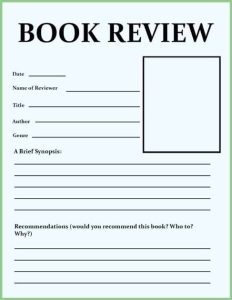
A book review is a critical assessment of a literature. A synopsis of the book’s key ideas and the reviewer’s thoughts.
Tips:
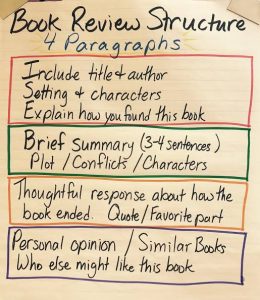
1.Introduce the book in a few phrases by summarizing its plot and mentioning if it is a part of a series or if reading previous novels in the series is necessary in order to enjoy this one.
2.Also, Talk about what you found most appealing about the book. Pay attention to your feelings and ideas regarding the narrative and the manner it was presented.
3.Meanwhile, Describe anything about the book that you didn’t enjoy. Explain why you believe it didn’t work out for you. To illustrate, would you have preferred a different conclusion to the one that left you feeling frustrated?
More Tips;
How to Write Book Review
4.However, to Condense your evaluation, Provide a brief summary of your feelings on the book and the kind of reader you would suggest it for. For instance, younger and older readers, as well as those who enjoy comedy, mystery, and romantic drama. Would you like to compare it to any particular novels or series?
5.If you would like, you may rate the book with a score of five or 10.
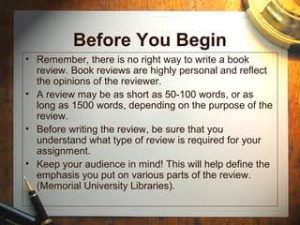
How to Write Book Review
6.What kind of data does the writer present to support their claims? Does the evidence hold up? If not, why not? Is the author’s argument sufficiently supported? literary elements
Summary
composing book reviews. By serving as guiding lights, book reviews help readers navigate the wide variety of stories present in the field of literature. But it’s not enough to simply summarize a book; you also need to make a connection between your thoughts and the reader. Whether you’re a writer, critic, or book lover, writing a book review can help the literary community as well as enhance your reading experience.

The Causes of Political Apathy

Child Neglect and Causes

Environment Care Tips

A Step-by-Step Guide to Deleting Reels on Instagram

A Comprehensive Guide to Setting Up a YouTube Premiere

How to Create a WhatsApp Group
-

 Business3 weeks ago
How to Promote your Business
-

 Fashion3 weeks ago
Fashion Guide for Beginners
-

 Business1 week ago
Customers Satisfaction
-

 Business3 weeks ago
Tips for Running Online Business
-

 Business2 weeks ago
Business Name Selection Tips
-

 TECHNOLOGY3 weeks ago
Artificial Intelligence and the Future