Editing
n-Track Studio Analysis


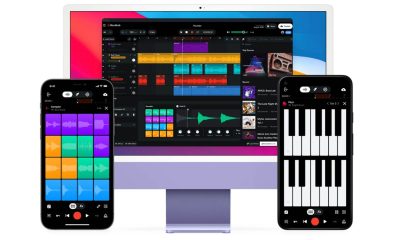
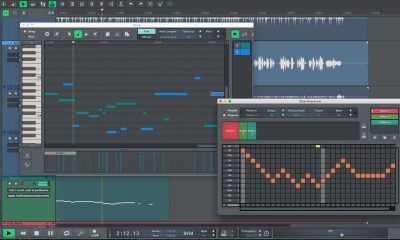
 N-track studio analysis. With an infinite number of audio/MIDI tracks, a built-in piano roll, a step sequencer for creating beats, and integrated effects like Guitar/Bass Amps, VocalTune, EQ, Reverb, and Compression, n-Track Studio is a cross-platform digital audio workstation (DAW) for multitrack recording, editing, and mixing. AI stem separation (AI MixSplit), compatibility for third-party plugins (VST, AU), Songtree cooperation, large sound libraries, and surround mixing are some of its key features. It is compatible with Windows, Mac, Android, and iOS.
N-TRACK STUDIO ANALYSIS
N-Track Software created the digital audio workstation (DAW) known as n-Track Studio. MIDI, step-sequencer recording, and multitrack audio are all supported on Windows, macOS, Linux, iOS, and Android. Audio editing, mixing, mastering, a wide range of effects and noises, AI stem separation, a custom sampler, compatibility for third-party plug-ins, and interaction with the Songtree collaboration platform are among its features. n-Track Studio is a versatile and powerful mobile app for music recording and production, available on both iOS and Android. It offers a professional-grade experience for musicians looking to record, mix, and produce music directly from their smartphones.
Features;

n-Track Studio Analysis
n-Track Studio comes equipped with a multi-track recorder that allows users to record and edit multiple tracks simultaneously. The app supports live audio recording with real-time effects like reverb, chorus, and compression. You can also import audio files and MIDI tracks, making it easy to mix and match different sounds. It even integrates with external audio interfaces, allowing you to connect microphones and instruments for higher-quality recordings.
The app’s virtual instruments include drums, bass, and piano, giving users the flexibility to build full tracks without any external equipment. Plus, with its EQ and audio effects suite, you can fine-tune your recordings to achieve professional sound quality.
Ease of Use;

n-Track Studio Analysis
While n-Track Studio offers a wide range of features, it maintains an easy-to-use interface. The app has a simple layout, allowing both beginners and advanced users to navigate the tools quickly. The drag-and-drop function and the ability to zoom in on waveforms make editing a breeze.
Performance;
n-Track Studio performs smoothly even when handling multiple tracks or high-quality audio. The app’s real-time processing allows for low-latency recording, ensuring a seamless production experience. It’s optimized to work well on both smartphones and tablets.
Verdict;

n-Track Studio Analysis
n-Track Studio is a solid choice for musicians looking for a mobile recording solution with a professional touch. With its multi-track capabilities, real-time effects, and support for external equipment, the app is ideal for serious producers and hobbyists alike. While it’s not free, its extensive features make it worth the investment for anyone who wants a full-featured music studio in their pocket.
Summary
Although some users find the interface less intuitive than competitors and report occasional CPU strain or bugs, n-Track Studio is a solid, feature-rich option for creators seeking cross-device flexibility, especially on iOS/Android, despite UI learning curves. It is a versatile, cross-platform DAW (Windows, macOS, Linux, iOS, and Android) that is praised for its powerful features, affordable pricing, and excellent mobile performance. It offers full production tools in your pocket with good virtual instruments and effects like VocalTune and amp simulators.







Editing Skills for News. Write a brief essay. It’s far more challenging than writing long essays. The internet is limitless, but readers’ attention spans are constrained. Your goal when editing a story is to make it shorter and more interesting so that readers will take note.
EDITING SKILLS FOR NEWS
Shaping raw material into a polished final product is a key component of editing skills. Editing talents are separated into two categories based on your field: written editing and video editing.
Editing Skills;
1) Go through each paragraph starting at the bottom. Missing words, incorrect punctuation, and poor syntax are what you’re looking for. Reading from the bottom will help you concentrate on the fundamentals of writing in English and increase your chances of spotting errors.

2) Read the piece out loud. A sentence is too long if you have to pause it to breathe. Cut it short.
3.Employ “bullets” (●). Make bulleted lists to help you organize your stories. You can steer clear of uncomfortable transitions by doing this.
4) Recognize your readers. Steer clear of using words that readers won’t come across in daily life. Make use of references.
5) Seek out superfluous words. utterly necessary; brand new; tragic death; general agreement; loop about. Get rid of the duplicate. Shorter and easier: consensus, circle, death, new, and crucial.

Editing Skills for News
6) In the duration of your story, minor adjustments can result in significant savings. The average article is 250 words long. If you can trim six words off of each paragraph, you can add two paragraphs or roughly 60 words of more material. Your “trims” may accumulate. An illustration of how to do it is provided here:
7) Allow the piece to “cook.” Take a coffee break, work on another project, or go to lunch. Return and read it with new eyes. There might be another item for you to cut.
8) Assign yourself this task based on your own writing. How can I cut the homework down to 50 words without leaving anything crucial out?
Get involved with your student newspaper;

Editing Skills for News
Student newspapers at many universities provide you with practical journalism experience. Consider working as a reporter or editor if print journalism is your thing. Participating in your student newspaper allows you to develop your writing abilities and learn about editing. For upcoming employment prospects, you can also include this experience on your CV. Additionally, some colleges include news stations where you can get practical broadcasting experience. copy editor
Summary
The process of examining and improving stories to make sure they are truthful, understandable, and equitable before they are published is known as news editing.
Essential tools for color calibration. The process of modifying and standardizing the colors shown on a monitor or other display device in order to guarantee precision and uniformity is known as color calibration. In an increasingly digital world where visual content is produced and seen on a range of devices, color integrity must be maintained from creation to consumption. Color calibration is necessary for this. Color accuracy is crucial for professionals in industries like photography and video production. Inconsistencies in print or digital output, misreading of visuals, and eventually discontent among customers or viewers are all consequences of inaccurate coloring. Professionals can achieve more consistent and dependable outcomes by calibrating monitors and other display devices to ensure that the colors they see exactly reflect the colors in their photos or videos.
ESSENTIAL TOOLS FOR COLOR CALIBRATION
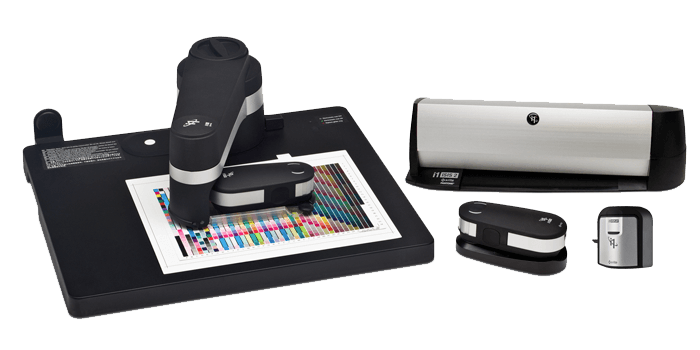
Hardware colorimeters (such as Datacolor SpyderPro and Calibrite Display Pro) and software that measures screen colors and generates ICC profiles for accuracy are essential color calibration tools. To guarantee consistent, accurate colors across displays, printers, and devices, these tools are essential for creatives, photographers, and video editors. Color calibration is the cornerstone of ensuring accurate and consistent colors in visual media, whether it’s photography, filmmaking, graphic design, or any other creative endeavor. In this comprehensive guide, we’ll delve into the importance of color calibration and explore the essential tools needed to achieve precise color accuracy.
1. Hardware Colorimeter:
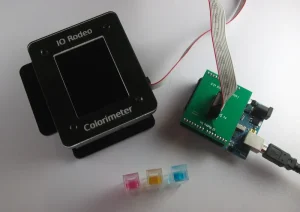
A tool for measuring and evaluating the colors shown on a monitor is a hardware colorimeter. In order to test color accuracy, it usually consists of a sensor that is mounted on the monitor screen and software that talks to the sensor. Popular brands include X-Rite and Datacolor, which offer a range of colorimeters suitable for different budgets and needs.
2. Calibration Software:
Calibration software is used in conjunction with a hardware colorimeter to perform the calibration process. This software guides users through the calibration process, taking measurements of various color patches displayed on the screen and adjusting monitor settings accordingly. Examples of calibration software include X-Rite i1Profiler and Datacolor SpyderX software.
3. Reference Images:

ESSENTIAL TOOLS FOR COLOR CALIBRATION
When assessing color accuracy throughout the calibration process, reference images—standardized photos with known color values—are utilized. These images typically include a range of colors, gradients. And patterns designed to test various aspects of color reproduction, such as hue, saturation, and brightness. Calibration software often includes built-in reference images for this purpose.
4. Monitor Hood:
A monitor hood is a shield that attaches to the monitor to reduce glare and ambient light. Ensuring more accurate color perception during the calibration process. By minimizing external light sources, a monitor hood helps create a controlled environment for color calibration, leading to more reliable results.
5. Color Calibration Targets:
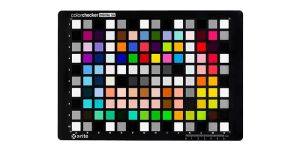
ESSENTIAL TOOLS FOR COLOR CALIBRATION
Color is measured and calibrated using it targets, like grayscale and color patches. During the calibration procedure, these goals are shown on the monitor. Allowing the colorimeter to measure and analyze the displayed colors. Calibration software provides instructions for positioning and displaying these targets correctly.
Summary
A key component of preserving color constancy and accuracy in visual media is color accuracy. by making an investment in the necessary color tools and adhering to standard practices. Experts can guarantee that their artistic vision is faithfully reflected on various platforms and gadgets. Whether you work as a graphic designer, photographer, or filmmaker. Gaining proficiency in it is crucial for creating excellent and eye-catching work.


Skills for editing news. Ruthless cutting, compelling headlines, distinct leads, active voice, and fact verification are all necessary for effective news editing, which emphasizes accuracy, clarity, and conciseness. Reading paragraphs backwards, reading aloud to understand lengthy phrases, emphasizing the “who, what, when, where,” citing sources, utilizing AP Style, and being ready for breaking news by remaining composed and working together are all important strategies.
SKILLS FOR EDITING NEWS
Strong writing, grammar, and storytelling skills, along with critical thinking, fact-checking, and accuracy all while comprehending audiences, digital platforms (SEO, social media), and handling deadlines under pressure are essential for news editing. Clarity, conciseness, impartiality, leadership, and flexibility in the face of changing media environments are essential skills for delivering compelling, dependable, and efficient information.
Editing Skills;

1) Go through each paragraph starting at the bottom. Missing words, incorrect punctuation, and poor syntax are what you’re looking for. Reading from the bottom will help you concentrate on the fundamentals of writing in English and increase your chances of spotting errors.
2) Read the piece out loud. A sentence is too long if you have to pause it to breathe. Cut it short.
3.Employ “bullets” (●). Make bulleted lists to help you organize your stories. You can steer clear of uncomfortable transitions by doing this.
4) Recognize your readers. Steer clear of using words that readers won’t come across in daily life. Make use of references.

5) Seek out superfluous words. utterly necessary; brand new; tragic death; general agreement; loop about. Get rid of the duplicate. Shorter and easier: consensus, circle, death, new, and crucial.
6) In the duration of your story, minor adjustments can result in significant savings. The average article is 250 words long. If you can trim six words off of each paragraph, you can add two paragraphs or roughly 60 words of more material. Your “trims” may accumulate. An illustration of how to do it is provided here:
7) Allow the piece to “cook.” Take a coffee break, work on another project, or go to lunch. Return and read it with new eyes. There might be another item for you to cut.

SKILLS FOR EDITING NEWS
8) Assign yourself this task based on your own writing. How can I cut the homework down to 50 words without leaving anything crucial out?
Get involved with your student newspaper;

SKILLS FOR EDITING NEWS
Student newspapers at many universities provide you with practical journalism experience. Consider working as a reporter or editor if print journalism is your thing. Participating in your student newspaper allows you to develop your writing abilities and learn about editing. For upcoming employment prospects, you can also include this experience on your CV. Additionally, some colleges include news stations where you can get practical broadcasting experience. copy editor
Summary
Write a brief essay. It’s far more challenging than writing long essays. The internet is limitless, but readers’ attention spans are constrained. Your goal when editing a story is to make it shorter and more interesting so that readers will take note.

Torchlight Selection

Best Practices for Face Exfoliation

Chemical Face Exfoliation

A Step-by-Step Guide to Deleting Reels on Instagram

A Comprehensive Guide to Setting Up a YouTube Premiere