WRITING
Technical and Academic Writing Tips



Technical and academic writing tips. Effective communication in each setting requires an understanding of the distinctions between academic and technical writing. Technical writing is on providing useful information in a clear, succinct, and user-friendly manner, whereas academic writing seeks to contribute to scholarly conversations through in-depth analysis and formal tone. By understanding these differences, writers can modify their style to suit the particular requirements of their target audience and goal.
TECHNICAL AND ACADEMIC WRITING TIPS
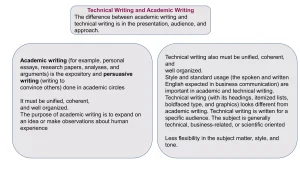
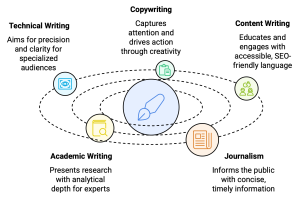
The main areas of distinction between academic and technical writing are style, audience, and goal. While academic writing concentrates on proving a theory or dissecting a subject for a scholarly audience, technical writing concentrates on teaching and clarity for a specific audience, hoping to assist them in completing a task.
1. Purpose and Audience;

• Academic Writing: Primarily aimed at contributing to scholarly discourse, academic writing seeks to inform, persuade, or explore theoretical concepts. Its audience includes students, researchers, and academicians who are often well-versed in the subject matter. Examples include research papers, theses, and literature reviews.
• Technical Writing: Focuses on conveying specific information clearly and concisely to help readers perform a task or understand a process. The audience can range from technical professionals to laypersons needing straightforward instructions. Examples include user manuals, technical reports, and instructional guides.
2. Structure and Organization;
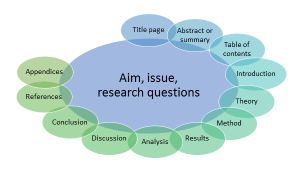
• Academic Writing: Typically follows a structured format, including an introduction, literature review, methodology, results, discussion, and conclusion. The organization emphasizes a logical flow of ideas, supporting arguments, and thorough analysis.
• Technical Writing: Uses a more flexible and practical structure, often including sections like introduction, background, procedure, and troubleshooting. The organization prioritizes clarity and ease of navigation, with headings, bullet points, and step-by-step instructions being common.
3. Style and Tone;
Technical and academic writing tips
• Academic Writing: Characterized by a formal, objective tone and a focus on critical analysis. The language is often complex, with the use of specialized terminology and citations from scholarly sources to support arguments.
• Technical Writing: Emphasizes simplicity and clarity, using straightforward language and avoiding unnecessary jargon. The tone is instructional and direct, aimed at making the information easily understandable and actionable.
4. Depth of Content;
Technical and academic writing tips
• Academic Writing: Delves deeply into theoretical frameworks, extensive literature reviews, and comprehensive data analysis. It often involves presenting and defending hypotheses, exploring abstract concepts, and contributing new knowledge to the field.
• Technical Writing: Concentrates on practical information and specific details necessary for understanding or completing a task. It is more focused on functionality, providing concrete instructions and solutions without delving into theoretical backgrounds.
5. Use of Sources and Citations;
Technical and academic writing tips
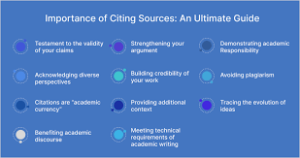
• Academic Writing: Requires rigorous sourcing and citation of all referenced material, following specific academic styles (APA, MLA, Chicago, etc.). This practice ensures credibility, allows for peer review, and acknowledges the work of others in the field.
• Technical Writing: While it may include references to support information or provide context, it is generally less focused on extensive citations. The emphasis is on providing clear and concise information that users can apply directly, often with in-house or original sources.
Summary
Both academic and technical domains require effective communication, but the approach and manner might differ greatly based on the goal and target audience. Technical writing and academic writing are two different types of communication, each with its own standards and objectives.













Good Writing Tips. Drafting and editing should be kept apart if you want to enhance your work right away. To get your ideas down on paper, swiftly write your initial draft without self-correction. After that, read your work aloud to identify any problematic wording and tighten your sentences by eliminating superfluous words.
GOOD WRITING TIPS
Tips for good writing. Whether you’re writing in your private journal or for your website, the suggestions below can help you enhance your ability to create content and elevate your writing from excellent to exceptional.
What is Good Writing?

Good writing is well organized and flows smoothly, having a consistent style or voice from start to finish. Good writing is also free of typos and faults in spelling, punctuation, and grammar.
Steps for Good Writing;
1. Write every day. Writing daily will help you improve your skills and sharpen your ability to construct grammatically accurate and appealing sentences
2. Use Active Voice: It’s more engaging than passive voice. Consider how “My mother baked the cake” is superior to “The cake was baked by my mother.”
3. Be a voracious reader Read widely to expand your vocabulary and improve your understanding of diverse writing styles. Explore various genres and authors.
4. Be clear and concise. For efficient communication, use clear and precise language. Avoid using unnecessary or flowery jargon that obscures your meaning.

5. Vary sentence structure. Change the structure of your sentences. This will make your writing more engaging for the reader.
6. Avoid overused words. Avoid using clichés and overused phrases. Strive to come up with innovative ways to express what you’re saying.
7. Be descriptive. Use descriptive language to assist your reader in envisioning your words. This will make what you wrote more memorable for the reader.
8. Use similes. Use similes and metaphors in your writing whenever it makes sense. This makes your writing more relatable to the reader.

Good Writing Tips
9. Use strong action words. Try to utilize powerful verbs rather than weak verbs. For example, instead of “walk,” use “saunter.” Instead of “get,” use “obtain.”
10. Avoid jargon. employing terms that are only familiar to a small set of readers.
Summary
Effective writing conveys a clear message to a target audience. It is error-free and use economical, dynamic language. Strong prose ultimately eliminates superfluous words to guarantee that the reader comprehends your precise meaning.

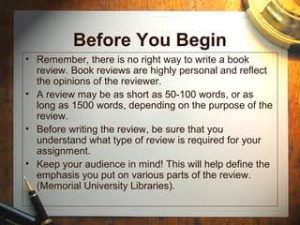
How to Write Book Review. An argument is made in a review. The fact that a review is a commentary rather than just a summary is its most crucial component. It enables you to engage in conversation and debate with the author of the piece as well as with other viewers. You can express agreement or disagreement and point out areas in which you think the work’s organization, expertise, or conclusions are excellent or lacking. With a thesis statement, supporting body paragraphs, and a conclusion, your opinion on the work in question should be expressed clearly. This statement will likely mirror other forms of academic writing.
HOW TO WRITE BOOK REVIEW
This handout will concentrate on book reviews; for a similar assignment, see our handout on literature reviews. A review is a critical assessment of a text, event, object, or phenomenon. Reviews can take into account books, articles, entire genres or fields of literature, architecture, art, fashion, restaurants, policies, exhibitions, performances, and many other forms.
What’s The Definition?
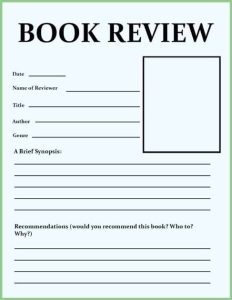
A book review is a critical assessment of a literature. A synopsis of the book’s key ideas and the reviewer’s thoughts.
Tips:
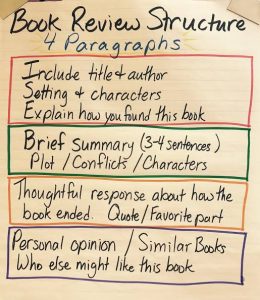
1.Introduce the book in a few phrases by summarizing its plot and mentioning if it is a part of a series or if reading previous novels in the series is necessary in order to enjoy this one.
2.Also, Talk about what you found most appealing about the book. Pay attention to your feelings and ideas regarding the narrative and the manner it was presented.
3.Meanwhile, Describe anything about the book that you didn’t enjoy. Explain why you believe it didn’t work out for you. To illustrate, would you have preferred a different conclusion to the one that left you feeling frustrated?
More Tips;
How to Write Book Review
4.However, to Condense your evaluation, Provide a brief summary of your feelings on the book and the kind of reader you would suggest it for. For instance, younger and older readers, as well as those who enjoy comedy, mystery, and romantic drama. Would you like to compare it to any particular novels or series?
5.If you would like, you may rate the book with a score of five or 10.
How to Write Book Review
6.What kind of data does the writer present to support their claims? Does the evidence hold up? If not, why not? Is the author’s argument sufficiently supported? literary elements
Summary
composing book reviews. By serving as guiding lights, book reviews help readers navigate the wide variety of stories present in the field of literature. But it’s not enough to simply summarize a book; you also need to make a connection between your thoughts and the reader. Whether you’re a writer, critic, or book lover, writing a book review can help the literary community as well as enhance your reading experience.

Torchlight Selection

Best Practices for Face Exfoliation

Chemical Face Exfoliation

A Step-by-Step Guide to Deleting Reels on Instagram

A Comprehensive Guide to Setting Up a YouTube Premiere