TECHNOLOGY
Tips for shutting down Iphone

Tips for shutting down Iphone. It’s crucial to know how to correctly shut down your iPhone for a number of reasons, such as extending battery life, resolving problems, or just taking a break. You may confidently turn off your iPhone anytime needed by following the instructions in this article. Gaining proficiency with this fundamental feature will guarantee a more seamless interaction with your iPhone, regardless of your level of experience.
TIPS FOR SHUTTING DOWN IPHONE
To turn off an iPhone, hold down the side and volume buttons (or, on previous models, only the side button) until a slider displays. Then, drag to turn off the device. Alternatively, to turn it off, select Settings > General > Shut Down.
Step 1: Locate the Side Button


The side button, located on the right side of your iPhone, serves multiple functions, including powering on/off your device, activating Siri, and taking screenshots. It’s important to differentiate between a quick press and a long press for shutting down the device.
Step 2: Simultaneously Press Side Button and Volume Button
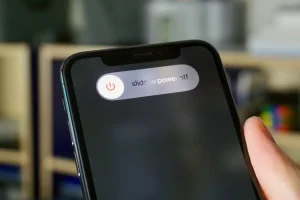
To initiate the power off process, simultaneously press and hold the side button and one of the volume buttons (either the volume up or volume down button) on your iPhone. Hold both buttons down at the same time until the “slide to power off” slider appears on the screen.
Step 3: Slide to Power Off


Tips for shutting down Iphone
Once the “slide to power off” slider appears, release the side button and volume button. You can then use your finger to slide the slider from left to right to power off your iPhone.
After sliding the power off slider, your iPhone will begin the shutdown process. Depending on your device model and any ongoing tasks, this process may take a few moments. Once shut down, your iPhone’s screen will go completely black, indicating that it is powered off.
Power On Your iPhone;

Tips for shutting down Iphone
To power on your iPhone again, simply press and hold the side button until the Apple logo appears on the screen. Your device will then boot up, and you can use it as usual.
Summary
Holding the side button and any volume button (Face ID) or only the side button (Home button) and sliding the slider will shut down your iPhone to improve efficiency and free up RAM. Use a forced restart (volume up, down, then hold the side button) for devices that are frozen. For optimal effects, leave it off for at least five minutes.