Uncategorized
The growth processes of the wisdom teeth

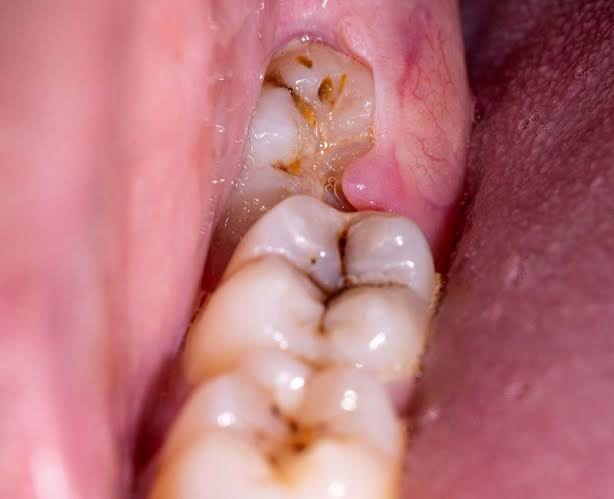
The last set of teeth to emerge in the human dentition are the third molars, commonly known as wisdom teeth. These teeth typically begin to erupt in late adolescence or early adulthood, usually between the ages of 17 and 25. While the signs and symptoms associated with the eruption of wisdom teeth can vary from person to person, there are several common signs to look out for:
1. Pain or Discomfort

One of the most noticeable signs of wisdom tooth eruption is pain or discomfort in the back of the mouth. This discomfort may be intermittent or persistent and can range from mild to severe. It may be exacerbated by chewing, biting, or pressure on the affected area.
2. Swelling and Tenderness

Swelling and tenderness in the gum tissue around the erupting wisdom teeth are common symptoms. The gum tissue may appear red, inflamed, and sensitive to touch. Swelling can contribute to difficulty in opening the mouth fully or discomfort when swallowing.
3. Gum Flap or Tissue Overgrowth
As wisdom teeth begin to emerge, a flap of gum tissue called an operculum may partially cover the tooth, creating a pocket where food particles and bacteria can become trapped. This can lead to inflammation, infection, and discomfort.
4. Difficulty Opening the Mouth
In some cases, the eruption of wisdom teeth may cause stiffness or limited range of motion in the jaw, making it challenging to open the mouth fully. This symptom, known as trismus, can be due to inflammation of the surrounding tissues or pressure from the erupting teeth.
5. Crowding or Shifting of Teeth
The presence of wisdom teeth can exert pressure on adjacent teeth, causing them to shift position or become crowded. This can lead to changes in dental alignment, bite irregularities, and increased risk of dental problems such as decay and gum disease.
6. Jaw Pain or Headaches
Discomfort associated with wisdom tooth eruption can radiate beyond the immediate area of the mouth, leading to jaw pain, headaches, and even ear pain. This referred pain may be intermittent or constant and can vary in intensity.
7. Bad Breath or Unpleasant Taste

Accumulation of food debris, bacteria, and plaque around partially erupted wisdom teeth can contribute to bad breath (halitosis) or an unpleasant taste in the mouth. Proper oral hygiene practices, including thorough brushing and flossing, can help alleviate these symptoms.
It’s important to note that not everyone experiences symptoms when their wisdom teeth erupt. Some individuals may have fully erupted wisdom teeth without any associated pain or discomfort, while others may require intervention due to complications such as impaction, infection, or crowding. Regular dental check-ups and X-rays can help monitor the development and eruption of wisdom teeth and identify any potential issues early on. If you experience any of the above signs or symptoms, consult with your dentist for proper evaluation and management.









Happiness Benefits. Unfortunately, a lot of people confuse happiness with a luxurious emotion that is only experienced in the here and now, such as tingling in the spine and warm, fuzzy feelings. Nonetheless, a growing amount of research is showing the tremendous benefits of happiness. It is very beneficial to us and pervades many important aspects of life.
HAPPINESS BENEFITS
Happiness has several positive effects on one’s body and mind, including improved health, less stress, and increased concentration. Since happiness is a subjective emotional experience that varies from person to person, it may be challenging to define.
In general, two primary elements make up happiness:

Overall, feeling more happy than negative emotions is the emotional equilibrium.
Life satisfaction refers to how content we are with various aspects of our lives, including our relationships, careers, hobbies, and the degree to which our lives are in line with our moral principles.
What is Happiness?
Happiness refers to our general sense of purpose and fulfillment in life, and it goes beyond simply being the absence of melancholy. It is possible to be happy and still feel detached, uninterested, or numb.
To what extent can we influence our happiness?

Happiness Benefits
Numerous outstanding studies have examined happiness, how we perceive it, and most importantly, what we can do to cultivate and preserve our happiness and well-being.
Among the important tactics noted in the research body are:
cultivating a thankful mindset
Assisting others
Maintaining our physical well-being by getting enough sleep and exercising
The benefits of happiness

Happiness Benefits
Here are some key takeaways:
1. It can strengthen your bonds with others.
2. It can increase your output: When you’re feeling good, you can generate more.
3. It may encourage healthier lifestyle choices: People who are happier exercise more.
4. It may result in improved immunological response: Happier People tend to be more resilient to colds and even heal wounds more quickly. Counseling and Psychological Services
Summary
Joy, contentment, and life satisfaction are characteristics of happiness, which is a pleasant emotional state. It encompasses both immediate enjoyment and long-term well being, as discussed in Positive Psychology.

Relevance of Meditation and Mindfulness. Today, developing mental resilience, lowering stress, and improving emotional control all benefit greatly from meditation and mindfulness. These techniques reduce cortisol, enhance focus, and promote general physical and mental well-being by teaching the brain to remain grounded in the present moment without passing judgment.
RELEVANCE OF MEDITATION AND MINDFULNESS
It can be difficult to focus on current events. We sometimes find ourselves obsessing over things from the past that we cannot change or thinking more about the future than the present. We may not be able to live in the present. With practice, present-moment awareness can be developed.
What is Mindfulness?
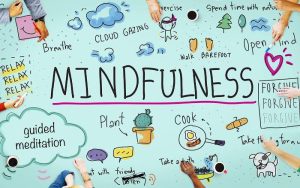
Relevance of Meditation and Mindfulness
Mindfulness means living in the present moment. Essentially, it means being (intentionally) more aware and awake to each moment and being fully engaged in what is happening in one’s surroundings with acceptance and without judgment.
Mindfulness has its roots in Buddhist meditation. In recent years, mindfulness has become a household term. Mindfulness programs are now commonly found in schools, workplaces, and hospitals.
What is Meditation?

Relevance of Meditation and Mindfulness
Among, if not the greatest art in life, meditation is one of the best. Because love exists in the comprehension of meditation, and love is not the result of routines, habits, or methodical application. One cannot grow love via contemplation. Perhaps total solitude is the best environment for love to blossom. And the understanding of the nature of its movement, as thought and feeling, is a prerequisite for the mind becoming silent. How to Start a Meditation Practice.
Summary
You become aware of your thoughts, emotions, sensations, environment, and both internal and exterior activity. You observe these times without making any judgments. This is what we call awareness. It can be difficult to focus on current events. Often, we discover ourselves

Measuring Drapes and Upholsteries. For draperies, measure the width of your rod and multiply the result by 1.5 to 3 for fullness. For curtains that “float” slightly above the ground, deduct 1/2 inch from the length measured from the rod to the floor. Measure the item’s broadest points (length, width, and height) and add seam allowances for upholstery.
MEASURING DRAPES AND UPHOLSTERIES
Use a flexible tape measure to measure each component of your furniture independently. On paper, label each section (e.g., inner back, seat, arms). For tucks and seams, increase your width and height measurements by at least 4 inches. Purchase an additional 10% to 15% of cloth for mistakes and designs. To estimate how much upholstery fabric you will need, a yardage chart is a great place to start if you want to attempt doing it yourself.
How Much Fabric IS Needed?

Start an upholstery project, run out of fabric, more of the exact same fabric, there are few things worse than that. For this reason, it is essential to be able to anticipate how much material you will require. There are a few fundamental guidelines to go by, though there will be a lot of variety based on the kind of furniture you are covering:
1.Measure each cushion’s length and width starting at the seam and working your way outward. Make sure you measure the side panels as well, and remember to give one inch for seam allowances. Covering one sofa cushion typically requires two yards of cloth.

Measuring Drapes and Upholsteries
2.Proceed to measure the sofa’s back from seam to seam. Once more, add one inch to the length and breadth of the couch for seam allowances. Take measurements of the sofa’s front width and length.
3.After that, measure the seating area’s exterior and inside after removing the cushions.
4.To calculate the yardage, take your figures and divide them by 3
5.Remember that upholstery fabric typically measures 54 inches in width.
Calculate The Amount Of Fabric;

Measuring Drapes and Upholsteries
Will Need The method for calculating fabric yardage for sofas and chairs is similar. Measure the piece’s length and width first. Measure the sides, back, and front, and don’t forget to account for seam allowances by adding one inch. After that, measure the frame, taking into consideration any places that have cloth covering them. Determine the overall length and width of the couch.
Summary
measurements for upholstery and drapes. Reupholstering couches and chairs is a great way to revitalize worn-out furniture. However, this undertaking is far from simple.Since determining fabric yardage for upholstery needs specialized knowledge, it is recommended to leave this project to the experts.

Torchlight Selection

Best Practices for Face Exfoliation

Chemical Face Exfoliation

A Step-by-Step Guide to Deleting Reels on Instagram

A Comprehensive Guide to Setting Up a YouTube Premiere