
WRITING
Academic Writing and Mistakes


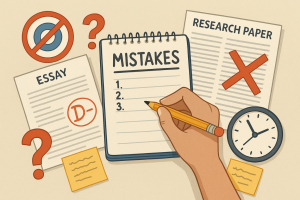
Academic writing and mistakes. Research-based arguments and evidence are the main focus of academic writing, a formal, objective writing style utilized in academic institutions and publications. It frequently uses technical vocabulary unique to a subject of study and is well-structured, precise, and easy to understand. Important features include a formal tone, the use of the third person, and an emphasis on concepts and facts rather than feelings or personal judgments.
ACADEMIC WRITING AND MISTAKES
Poor thesis statements, informal language, a lack of grasp of the assignment, and a weak framework are all common errors in academic writing. Citations, plagiarism, ambiguous and wordy sentences, excessive use of passive voice, and improper editing and proofreading are other frequent mistakes. Academic writing requires clarity, precision, and adherence to specific conventions. Avoiding common mistakes can significantly improve the quality of your work. Here are key pitfalls and how to avoid them:
1. Lack of Clarity and Precision;

The Common Mistakes: Using vague language and complex sentences.
Solution: Use specific terms and clear, concise language. Break down complex ideas into simpler parts.
2. Poor Structure and Organization;
Mistake: Disorganized content that lacks logical flow.
Solution: Outline your paper before writing. Follow a clear structure with an introduction, body, and conclusion. Use headings and subheadings to guide the reader.
3. Weak Thesis Statement;

The Common Mistakes: An unclear or unfocused thesis statement.
Solution: Develop a strong, clear thesis statement. Ensure all content supports and relates to your thesis.
4. Insufficient Evidence and Analysis;

The Common Mistakes: Making claims without adequate support.
Solution: Back up claims with robust evidence from credible sources. Analyze the evidence and explain its relevance.
5. Overuse of Passive Voice;
Mistake: Excessive use of passive voice, making the writing indirect.
Solution: Use active voice to make sentences more dynamic and clear. For example, use “The researchers conducted the experiment” instead of “The experiment was conducted by the researchers.”
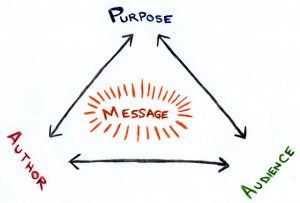
6. Ignoring Audience and Purpose;
Academic writing and mistakes
Mistake: Not considering the audience’s knowledge level.
Solution: Tailor your writing to your audience. Use a formal tone and avoid colloquial language unless appropriate.
7. Poor Citation Practices;
Mistake: Failing to properly cite sources.
Solution: Always cite sources according to the required style (APA, MLA, Chicago). Use plagiarism detection tools to ensure originality.
8. Inadequate Editing and Proofreading;

Academic writing and mistakes
Mistake: Submitting work with grammatical errors and typos.
Solution: Edit and proofread meticulously. Check for grammar, spelling, and punctuation errors. Have someone else review your work.
9. Overloading with Jargon;
Mistake: Using excessive jargon and technical terms.
Solution: Use jargon sparingly. Provide definitions for terms that may not be widely known.
10. Lack of Critical Thinking and Originality;

Academic writing and mistakes
Mistake: Merely summarizing existing literature without original insights.
Solution: Engage critically with sources. Offer original insights and suggest areas for further research.
Summary
Your academic work will be of higher quality and have greater impact if you avoid these typical errors. Focus on clarity, structure, evidence, and critical analysis to produce captivating, well-organized works. Keep in mind that academic writing is a skill that gets better with practice and criticism.










Good Writing Tips. Drafting and editing should be kept apart if you want to enhance your work right away. To get your ideas down on paper, swiftly write your initial draft without self-correction. After that, read your work aloud to identify any problematic wording and tighten your sentences by eliminating superfluous words.
GOOD WRITING TIPS
Tips for good writing. Whether you’re writing in your private journal or for your website, the suggestions below can help you enhance your ability to create content and elevate your writing from excellent to exceptional.
What is Good Writing?

Good writing is well organized and flows smoothly, having a consistent style or voice from start to finish. Good writing is also free of typos and faults in spelling, punctuation, and grammar.
Steps for Good Writing;
1. Write every day. Writing daily will help you improve your skills and sharpen your ability to construct grammatically accurate and appealing sentences
2. Use Active Voice: It’s more engaging than passive voice. Consider how “My mother baked the cake” is superior to “The cake was baked by my mother.”
3. Be a voracious reader Read widely to expand your vocabulary and improve your understanding of diverse writing styles. Explore various genres and authors.
4. Be clear and concise. For efficient communication, use clear and precise language. Avoid using unnecessary or flowery jargon that obscures your meaning.

5. Vary sentence structure. Change the structure of your sentences. This will make your writing more engaging for the reader.
6. Avoid overused words. Avoid using clichés and overused phrases. Strive to come up with innovative ways to express what you’re saying.
7. Be descriptive. Use descriptive language to assist your reader in envisioning your words. This will make what you wrote more memorable for the reader.
8. Use similes. Use similes and metaphors in your writing whenever it makes sense. This makes your writing more relatable to the reader.

Good Writing Tips
9. Use strong action words. Try to utilize powerful verbs rather than weak verbs. For example, instead of “walk,” use “saunter.” Instead of “get,” use “obtain.”
10. Avoid jargon. employing terms that are only familiar to a small set of readers.
Summary
Effective writing conveys a clear message to a target audience. It is error-free and use economical, dynamic language. Strong prose ultimately eliminates superfluous words to guarantee that the reader comprehends your precise meaning.

How to Write Book Review. An argument is made in a review. The fact that a review is a commentary rather than just a summary is its most crucial component. It enables you to engage in conversation and debate with the author of the piece as well as with other viewers. You can express agreement or disagreement and point out areas in which you think the work’s organization, expertise, or conclusions are excellent or lacking. With a thesis statement, supporting body paragraphs, and a conclusion, your opinion on the work in question should be expressed clearly. This statement will likely mirror other forms of academic writing.
HOW TO WRITE BOOK REVIEW
This handout will concentrate on book reviews; for a similar assignment, see our handout on literature reviews. A review is a critical assessment of a text, event, object, or phenomenon. Reviews can take into account books, articles, entire genres or fields of literature, architecture, art, fashion, restaurants, policies, exhibitions, performances, and many other forms.
What’s The Definition?
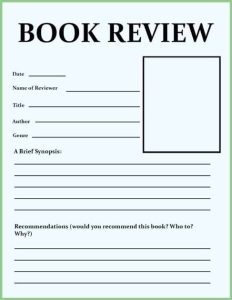
A book review is a critical assessment of a literature. A synopsis of the book’s key ideas and the reviewer’s thoughts.
Tips:
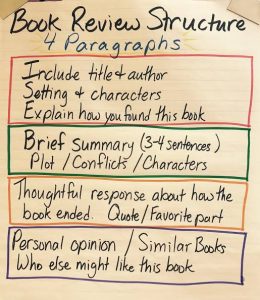
1.Introduce the book in a few phrases by summarizing its plot and mentioning if it is a part of a series or if reading previous novels in the series is necessary in order to enjoy this one.
2.Also, Talk about what you found most appealing about the book. Pay attention to your feelings and ideas regarding the narrative and the manner it was presented.
3.Meanwhile, Describe anything about the book that you didn’t enjoy. Explain why you believe it didn’t work out for you. To illustrate, would you have preferred a different conclusion to the one that left you feeling frustrated?
More Tips;
How to Write Book Review
4.However, to Condense your evaluation, Provide a brief summary of your feelings on the book and the kind of reader you would suggest it for. For instance, younger and older readers, as well as those who enjoy comedy, mystery, and romantic drama. Would you like to compare it to any particular novels or series?
5.If you would like, you may rate the book with a score of five or 10.
How to Write Book Review
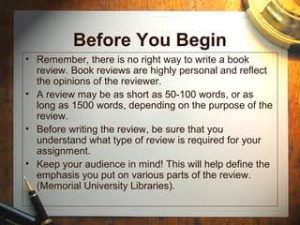
6.What kind of data does the writer present to support their claims? Does the evidence hold up? If not, why not? Is the author’s argument sufficiently supported? literary elements
Summary
composing book reviews. By serving as guiding lights, book reviews help readers navigate the wide variety of stories present in the field of literature. But it’s not enough to simply summarize a book; you also need to make a connection between your thoughts and the reader. Whether you’re a writer, critic, or book lover, writing a book review can help the literary community as well as enhance your reading experience.

The Causes of Political Apathy

Child Neglect and Causes

Environment Care Tips

A Step-by-Step Guide to Deleting Reels on Instagram

A Comprehensive Guide to Setting Up a YouTube Premiere

How to Create a WhatsApp Group
-

 Business3 weeks ago
How to Promote your Business
-

 Fashion3 weeks ago
Fashion Guide for Beginners
-

 Business2 weeks ago
Business Name Selection Tips
-

 Business1 week ago
Customers Satisfaction
-

 Business3 weeks ago
Tips for Running Online Business
-

 TECHNOLOGY3 weeks ago
Artificial Intelligence and the Future