WRITING
Efficient usage of chatgpt


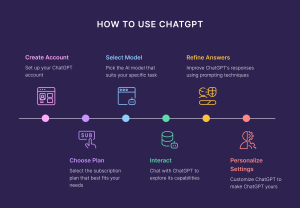
Efficient usage of chatgpt. Providing precise context, using file uploads for data analysis, creating personas, and utilizing sophisticated capabilities like browsing and custom instructions are all necessary for effective ChatGPT use. Use iterative refining, establish a customized prompt library to save time, and divide complicated jobs into smaller prompts for optimum efficiency.
EFFICIENT USAGE OF CHATGPT
In today’s digital age, artificial intelligence has become an integral part of our lives, simplifying tasks and enhancing productivity. Among the myriad AI-powered tools available, ChatGPT stands out as a versatile and resourceful assistant, capable of aiding users in various domains.
Understanding ChatGPT:
Before diving into practical tips, it’s essential to grasp the fundamentals of it. Developed by OpenAI, it is a state-of-the-art language model trained on vast datasets, enabling it to comprehend and generate human-like text across diverse topics. It operates based on a “prompt-response” mechanism, where users input queries or statements, and ChatGPT generates relevant and coherent responses in real-time. Whether you’re conversing on the ChatGPT app, website, or integrating it into your platform via APIs, the underlying functionality remains consistent.
Tips for Effective Usage:
1. Provide Clear and Specific Prompts:

When interacting with ChatGPT, clarity is key. Clearly articulate your queries or requests, providing as much context as possible. This helps it understand your intentions accurately, leading to more relevant and satisfactory responses.
2. Experiment with Different Prompt Formats:
It responds well to various prompt formats, including questions, statements, or even incomplete phrases. Experiment with different styles to uncover the most effective approach for your specific needs.
3. Leverage Keywords and Context:

Incorporating relevant keywords and context into your prompts can significantly enhance the quality of ChatGPT’s responses. By guiding the conversation and providing additional information, you empower it to generate more accurate and insightful outputs.
4. Utilize Conversation History:
If you’re engaging in a prolonged conversation with ChatGPT, leverage the conversation history feature to maintain context and continuity. Referencing previous exchanges helps ChatGPT deliver more coherent responses and fosters a more seamless interaction experience.
5. Fine-tune Responses:

Efficient usage of chatgpt
In instances where ChatGPT’s responses require refinement or clarification, don’t hesitate to provide feedback and guide the conversation accordingly. It continuously learns from user interactions, and constructive input contributes to its ongoing improvement.
6. Explore Specialized Models and Features:
OpenAI offers specialized versions of ChatGPT tailored for specific applications, such as programming (CodeGPT) or generating creative content (DALL-E). Explore these specialized models and features to leverage ChatGPT’s capabilities in specialized domains.
Etiquette and Responsible Usage:
Efficient usage of chatgpt
While ChatGPT provides a wealth of opportunities for engagement and assistance, it’s imperative to exercise responsible usage and adhere to ethical guidelines. Avoid soliciting or engaging in activities that promote harm, misinformation, or unethical behavior. Additionally, respect it’s capabilities and limitations, refraining from exploiting it for malicious purposes or deceptive practices.
Summary
Making the most of ChatGPT can significantly improve your online experience, whether you’re looking for information, coming up with ideas, or just having a casual conversation. We’ll explore the nuances of utilizing ChatGPT efficiently in this post, going over important tactics and best practices to optimize its usefulness.





Good Writing Tips. Drafting and editing should be kept apart if you want to enhance your work right away. To get your ideas down on paper, swiftly write your initial draft without self-correction. After that, read your work aloud to identify any problematic wording and tighten your sentences by eliminating superfluous words.
GOOD WRITING TIPS
Tips for good writing. Whether you’re writing in your private journal or for your website, the suggestions below can help you enhance your ability to create content and elevate your writing from excellent to exceptional.
What is Good Writing?

Good writing is well organized and flows smoothly, having a consistent style or voice from start to finish. Good writing is also free of typos and faults in spelling, punctuation, and grammar.
Steps for Good Writing;
1. Write every day. Writing daily will help you improve your skills and sharpen your ability to construct grammatically accurate and appealing sentences
2. Use Active Voice: It’s more engaging than passive voice. Consider how “My mother baked the cake” is superior to “The cake was baked by my mother.”
3. Be a voracious reader Read widely to expand your vocabulary and improve your understanding of diverse writing styles. Explore various genres and authors.
4. Be clear and concise. For efficient communication, use clear and precise language. Avoid using unnecessary or flowery jargon that obscures your meaning.

5. Vary sentence structure. Change the structure of your sentences. This will make your writing more engaging for the reader.
6. Avoid overused words. Avoid using clichés and overused phrases. Strive to come up with innovative ways to express what you’re saying.
7. Be descriptive. Use descriptive language to assist your reader in envisioning your words. This will make what you wrote more memorable for the reader.
8. Use similes. Use similes and metaphors in your writing whenever it makes sense. This makes your writing more relatable to the reader.

Good Writing Tips
9. Use strong action words. Try to utilize powerful verbs rather than weak verbs. For example, instead of “walk,” use “saunter.” Instead of “get,” use “obtain.”
10. Avoid jargon. employing terms that are only familiar to a small set of readers.
Summary
Effective writing conveys a clear message to a target audience. It is error-free and use economical, dynamic language. Strong prose ultimately eliminates superfluous words to guarantee that the reader comprehends your precise meaning.

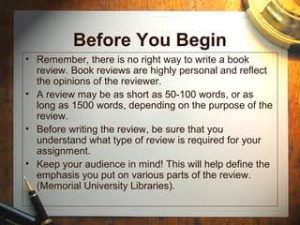
How to Write Book Review. An argument is made in a review. The fact that a review is a commentary rather than just a summary is its most crucial component. It enables you to engage in conversation and debate with the author of the piece as well as with other viewers. You can express agreement or disagreement and point out areas in which you think the work’s organization, expertise, or conclusions are excellent or lacking. With a thesis statement, supporting body paragraphs, and a conclusion, your opinion on the work in question should be expressed clearly. This statement will likely mirror other forms of academic writing.
HOW TO WRITE BOOK REVIEW
This handout will concentrate on book reviews; for a similar assignment, see our handout on literature reviews. A review is a critical assessment of a text, event, object, or phenomenon. Reviews can take into account books, articles, entire genres or fields of literature, architecture, art, fashion, restaurants, policies, exhibitions, performances, and many other forms.
What’s The Definition?
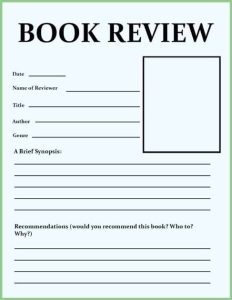
A book review is a critical assessment of a literature. A synopsis of the book’s key ideas and the reviewer’s thoughts.
Tips:
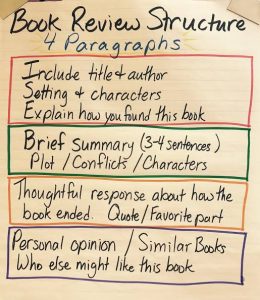
1.Introduce the book in a few phrases by summarizing its plot and mentioning if it is a part of a series or if reading previous novels in the series is necessary in order to enjoy this one.
2.Also, Talk about what you found most appealing about the book. Pay attention to your feelings and ideas regarding the narrative and the manner it was presented.
3.Meanwhile, Describe anything about the book that you didn’t enjoy. Explain why you believe it didn’t work out for you. To illustrate, would you have preferred a different conclusion to the one that left you feeling frustrated?
More Tips;
How to Write Book Review
4.However, to Condense your evaluation, Provide a brief summary of your feelings on the book and the kind of reader you would suggest it for. For instance, younger and older readers, as well as those who enjoy comedy, mystery, and romantic drama. Would you like to compare it to any particular novels or series?
5.If you would like, you may rate the book with a score of five or 10.
How to Write Book Review
6.What kind of data does the writer present to support their claims? Does the evidence hold up? If not, why not? Is the author’s argument sufficiently supported? literary elements
Summary
composing book reviews. By serving as guiding lights, book reviews help readers navigate the wide variety of stories present in the field of literature. But it’s not enough to simply summarize a book; you also need to make a connection between your thoughts and the reader. Whether you’re a writer, critic, or book lover, writing a book review can help the literary community as well as enhance your reading experience.

Dilation of the Pupil

Blurry Vision Diagnosis

Key Benefits of Kids Reading Aloud

A Step-by-Step Guide to Deleting Reels on Instagram

A Comprehensive Guide to Setting Up a YouTube Premiere